Toggle App Mode
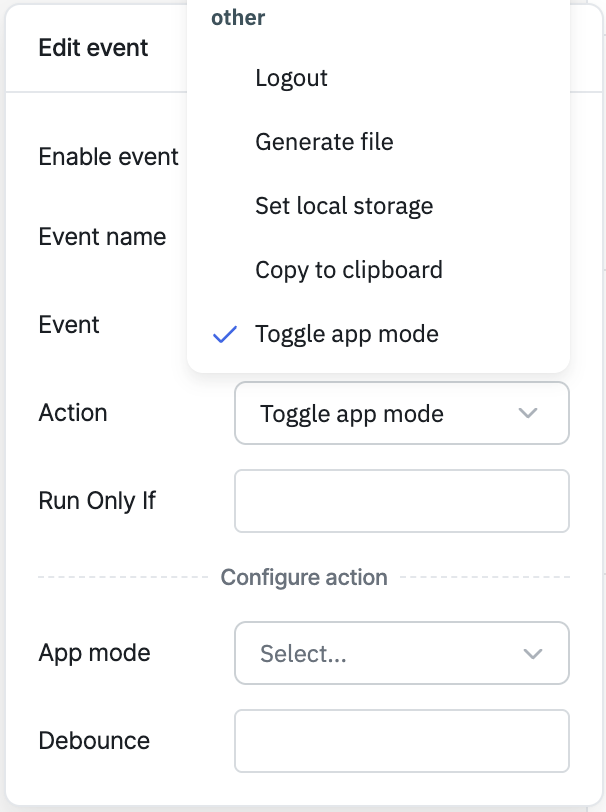
The Toggle App Mode action switches the app's rendered theme between light and dark at runtime.
note
This action only has an effect when the app's global App mode setting (App Builder → Left Sidebar → Global Settings) is set to Auto. If App mode is fixed to Light or Dark, this action does nothing.
Configuration
| Parameter | Description | Default |
|---|---|---|
| App mode | The theme to switch to: Light or Dark. If left empty, the action flips to the opposite of the app's current theme. | Empty |
| Debounce | Time in milliseconds to wait before executing the action | Empty (no delay) |
Behavior
- Only takes effect when the app's App mode global setting is Auto — otherwise the action is a no-op.
- If no value is provided (in the Events panel or via RunJS), it toggles to the opposite of the current theme.
- Persists the selected theme to the browser's local storage, so it's remembered on reload.
Triggering via RunJS
actions.toggleAppMode();
// or
actions.toggleAppMode('dark');
actions.toggleAppMode('light');
info
For a full quick-reference of all actions' RunJS syntax, see Run Actions from RunJS.