AI Best Practices
Getting the most out of ToolJet AI comes down to two habits: writing prompts that give the AI enough context to work with, and managing your conversation length so the AI stays sharp throughout your session. This guide covers both.
Understanding the Context Window
Every AI conversation in ToolJet has a context window — the total amount of information the AI can actively hold in memory for a single chat session. This includes everything you have typed and everything the AI has responded with in that session.
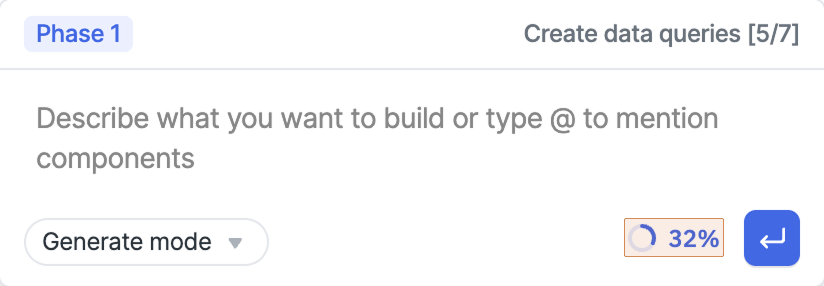
ToolJet AI shows a small indicator in the chat interface that tells you how much of the current session's context has been used. The limit per chat is 200,000 tokens.
What Is a Token?
A token is the unit ToolJet AI uses to measure conversation size. Roughly speaking, one token is about four characters of text. Both your messages (input) and the AI's responses (output) consume tokens.
Tokens are not the same as credits. Credits are a billing unit that measures AI processing cost. Tokens measure how much of the conversation the AI can currently hold in memory. A longer conversation uses more tokens, but credit consumption is based on the complexity of each operation, not directly on token count.
Why the Context Window Matters
As a conversation grows longer, the AI carries more history with each new message. When the context window approaches its limit, the AI has less room to reason effectively. Around the 70% mark, you may start to notice the AI skipping steps, giving less precise answers, or losing track of details from earlier in the conversation.
This is not a bug — it is a natural limitation of how AI models work. The fix is straightforward: start a new chat.
When to Start a New Chat
Start a new chat when the context usage indicator approaches 70%. Beginning a fresh session gives the AI a clean slate and restores full performance.
A few other situations where a new chat helps:
- You have finished one task and are moving on to something unrelated.
- The AI's responses are becoming repetitive or less accurate.
- Your conversation has gone through many rounds of back-and-forth refinement.
Starting a new chat for different tasks also makes your sessions more efficient — the AI doesn't carry irrelevant history from a previous task into the next one.
Prompting Tips
How you phrase a request directly affects the quality of what ToolJet AI produces. A well-structured prompt gives the AI the context it needs to build exactly what you have in mind.
Include Business Context
Don't just describe the tool — explain the problem it solves. The AI uses this context to make better decisions about structure, data, and workflows.
Instead of: "Build a CRM"
Try: "Our sales team tracks leads across five spreadsheets, causing duplicates and missed follow-ups. We need a centralized tool where reps can log leads, managers can see pipeline status, and the team gets reminders for overdue follow-ups."
Define Who Uses the Tool
Describe the different user types and what each of them needs to do. This shapes how the AI structures access, views, and workflows.
Example: "Sales reps need to add and update leads. Managers need a pipeline overview and team performance metrics. No other access is needed."
Describe Flows, Not Just Features
Instead of listing features, describe how users will move through the tool step by step. This produces more coherent apps than a feature checklist.
Keep Tasks Focused
Send one focused task at a time rather than bundling multiple requirements into a single prompt. Smaller, specific tasks are easier for the AI to execute correctly, and easier for you to review and refine.
Start Small, Then Expand
Begin with the core workflow — three or four pages covering the essentials — and add complexity after validating the basics. This keeps early sessions short, limits context consumption, and makes it easier to course-correct.
For a full guide on structuring prompts with examples, see Prompting 101.