gRPC 2.0
This documentation covers the gRPC 2.0 data source with enhanced features including server reflection and proto file URL import. The legacy gRPC data source is still available but is deprecated.
What's New in gRPC 2.0
The new gRPC 2.0 data source provides significant improvements over the legacy version:
- Server Reflection Support: Dynamically discover services and methods without proto files
- Proto File URL Import: Import proto files from remote URLs
- Authentication: Basic, Bearer, and API Key authentication
- SSL/TLS Configuration: Comprehensive certificate management
- Custom Metadata Headers: Support for API keys and custom authentication
- Cloud-Ready: No local file system dependencies
Pre-Requisite: Upgrade ToolJet to Version 2.5 or Above
Find instructions on how to do this in the setup guides located here: ToolJet Setup.
Unlike the legacy gRPC data source, gRPC 2.0 doesn't require proto files on your server unless you choose to import them from the file system. It supports:
- Server Reflection: Automatically discover services from your gRPC server
- Proto File URLs: Import proto files directly from remote URLs
- File system: Import proto files from the ToolJet server. See Proto Files from the File System.
If you're upgrading from the legacy gRPC data source, you no longer need to:
- Create a
/protosdirectory - Mount volumes in docker-compose.yml
- Restart your ToolJet instance for proto file changes
Proto File Configuration
gRPC 2.0 offers three methods for defining your service schema:
Server Reflection (Recommended)
Server reflection allows ToolJet to automatically discover all available services and methods from your gRPC server. This is the most flexible approach as it adapts to schema changes without requiring updates in ToolJet.
Prerequisites for Server Reflection:
- Your gRPC server must have reflection enabled
- The server must be accessible from your ToolJet instance
Enabling Reflection on Your gRPC Server:
For Go servers:
import "google.golang.org/grpc/reflection"
s := grpc.NewServer()
// Register your services...
reflection.Register(s)
For Node.js servers:
const reflection = require('@grpc/reflection');
reflection.loadSync(server);

Proto File URL Import
If server reflection is not available or you prefer to use a specific proto file, you can import it directly from a URL.
Supported URL formats:
https://example.com/api.protohttps://raw.githubusercontent.com/user/repo/main/api.proto- Any publicly accessible HTTPS URL serving a
.protofile

Proto Files from the File System
If you self-host ToolJet, you can load .proto files from a directory on the ToolJet server. ToolJet reads every file matching **/*.proto under ~/protos, the protos directory in the home directory of the user running the ToolJet server. In the official Docker images this is /home/appuser/protos, so mount your proto files there.
When you select Import .proto files from the file system, ToolJet scans the directory and lists the services it finds in Services. Select at least one service. Only the selected services are available in queries. If the directory doesn't exist or contains no proto files, the list is empty.
Connecting to gRPC 2.0
After configuring your proto schema, establish a connection by going to the data source page.
Connection Configuration
ToolJet gRPC 2.0 requires the following configuration:
Basic Settings
- Server URL: Your gRPC server endpoint (e.g.,
grpcb.in:9001orhttps://api.example.com:443) - Proto files: Choose Use server reflection for multiple files, Import single .proto file from URL (then enter the Proto file URL), or Import .proto files from the file system (then select Services)
- Metadata: Key-value pairs for custom headers (optional)

Authentication Options
Select one of the following in Authentication type:
- None (default)
- No authentication required
- Basic
- Username and Password
- Sends an
authorization: Basic <credentials>metadata entry with each request
- Bearer
- Token
- Sends an
authorization: Bearer <token>metadata entry with each request. TheBearerprefix can't be changed. To use a different prefix, select None and add theauthorizationentry in Metadata.
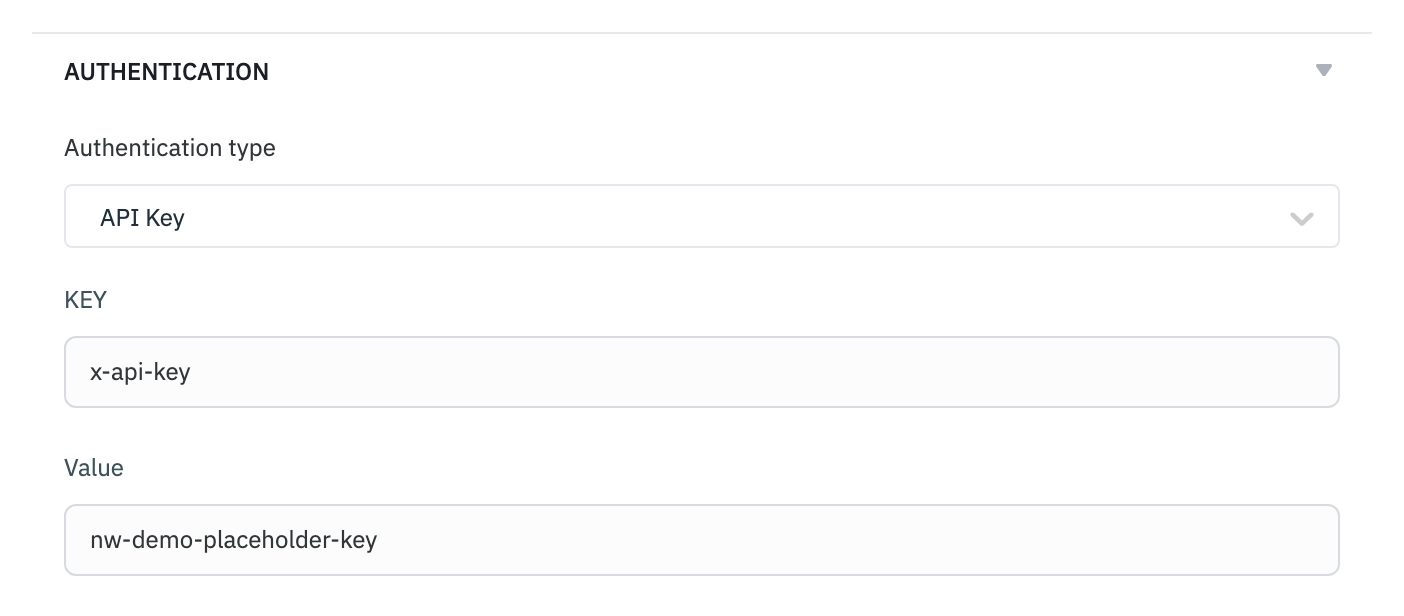
- API Key
- KEY and Value
- Sends a metadata entry named after the key, for example
x-api-key: <your-api-key>
SSL/TLS Configuration
Enhanced security options for encrypted connections:
- SSL/TLS Toggle
- Enable/disable SSL encryption
- Certificate Types:
- None: Verifies the server certificate against the default trusted CAs
- CA Certificate: Verify server with custom CA
- Client Certificate: Mutual TLS with client certificates
- Certificate Management:
- Secure storage of certificates
- Support for PEM format certificates
- Separate fields for CA cert, client cert, and private key

Custom Metadata Headers
gRPC 2.0 supports custom metadata headers for flexible authentication and request customization:
Use Cases:
- API key authentication (
x-api-key: your-api-key) - Custom authorization headers
- Request tracking headers
- Service-specific metadata
Configuration:
- Key-value pair interface similar to REST API headers
- Support for encrypted values
- Dynamic values using ToolJet variables
Creating Queries
Once configured, the gRPC 2.0 data source will be available in your application's query panel.
Service and Method Selection
- Select your gRPC 2.0 data source.
- Open the Select service dropdown. It lists each service with its methods, discovered through server reflection, loaded from the proto file URL, or, in file system mode, the services selected in the data source. Type to search.
- Select a method. Streaming methods are listed but disabled, because only unary methods are supported.

Request Configuration
The query editor has two tabs:
- Request: The request message as JSON. Write nested objects and repeated fields as JSON objects and arrays.
- Metadata: Key-value metadata entries for this query. They're sent along with the data source's Metadata, and an entry with the same key replaces the data source's value.
Each call times out after 2 minutes. The timeout can't be changed.
Migration from Legacy gRPC
If you're currently using the legacy gRPC data source, here's how to migrate:
Key Differences
| Feature | Legacy gRPC | gRPC 2.0 |
|---|---|---|
| Proto Files | Local file system | Server Reflection, URL Import, or local file system |
| Authentication | Basic, Bearer, API Key | Basic, Bearer, API Key |
| SSL/TLS | Limited | Full certificate management |
| Setup | Manual file mounting | Zero configuration |
| Schema Updates | Server restart required | Automatic with reflection |
Migration Steps
- Create New gRPC 2.0 Data Source
- Add gRPC 2.0 from the global data sources page
- Configure with the same server URL
- Choose Proto Method
- If your server supports reflection: Select "Server Reflection"
- If using proto files: Upload them to a public URL and use Import single .proto file from URL, or mount them on the ToolJet server and use Import .proto files from the file system
- Update Authentication
- Basic, Bearer, and API Key authentication work the same way
- Update Queries
- Recreate queries using the new data source
- Test functionality with the new interface
- Remove Legacy Setup (Optional)
- Remove the
/protosdirectory - Remove volume mounts from docker-compose.yml
- Remove legacy gRPC data source
- Remove the
Legacy Support The legacy gRPC data source remains available but is deprecated. New projects should use gRPC 2.0, and existing projects are encouraged to migrate.