CJIS - Aligned Internal Tooling Using ToolJet
ToolJet can be deployed within agency-controlled environments to build internal tools that handle Criminal Justice Information (CJI). This guide maps CJIS Security Policy requirements to infrastructure controls, identity configuration, and application-layer enforcement.
This guide is not a comprehensive representation of the CJIS Security Policy. It may be incomplete or contain inaccuracies. Always refer to the official CJIS Security Policy and consult qualified compliance personnel for your specific deployment.
There is no CJIS certification for platforms. Compliance is the agency's responsibility — ToolJet enables enforcement through correct configuration.
Shared Responsibility Model
| Layer | Owner | What They Control |
|---|---|---|
| Infrastructure | Agency | Network isolation, encryption at rest, patching |
| Identity | Agency | Authentication, MFA, access lifecycle |
| Data Systems | Agency | CJI storage, classification, protection |
| Application | Shared | Access enforcement, query control, audit logging |
| ToolJet Platform | ToolJet | RBAC, SSO integration, logging capabilities |
ToolJet Capability Mapping
| Control Area | CJIS Requirement | ToolJet Capability |
|---|---|---|
| Access Control | Unique IDs, least privilege | RBAC and SAML SSO |
| Audit Logging | Activity tracking, retention | Built-in logging with SIEM export |
| Data Residency | Agency-controlled storage | Self-hosted deployment |
| Network Security | Isolation, segmentation | Private deployment support |
| Encryption | TLS, FIPS 140-2 | Operates within infrastructure controls |
| AI Controls | Restrict CJI from AI systems | Configurable, can be disabled |
Implementation Workflow
1. Define Deployment Boundary
- Deploy ToolJet within a private VPC or on-premise setup
- Restrict all public internet access
- Route traffic through controlled gateways
2. Configure Identity and Authentication
- Integrate SAML-based SSO
- Enforce MFA at the identity provider level
- Ensure unique user identification per CJIS Security Policy §5.6.2.1
3. Configure Authorization
- Define RBAC roles mapped to job functions
- Enforce least privilege access
- Segment administrative and operational roles
4. Configure Data Access
- Connect to databases using TLS-secured connections
- Avoid caching or persisting CJI within ToolJet
- Enforce database-level access controls
5. Enable Audit Logging
- Capture all user actions and queries
- Export logs to SIEM (Splunk, Elastic Stack)
- Define retention policies per CJIS requirements
6. Enforce Network Controls
- Restrict ingress and egress traffic
- Use reverse proxies and firewalls
- Segment workloads
7. Configure Encryption
- Enforce TLS 1.2+ for all communications
- Enable encryption at rest in databases and storage
- Use FIPS 140-2 validated cryptographic modules
8. Maintain System Integrity
- Apply regular patches to OS and containers
- Harden configurations using CIS benchmarks
- Perform vulnerability scanning on infrastructure
9. Configure AI Controls (Optional)
- Disable AI features for workflows involving CJI
- Restrict usage to approved or internal models
- Prevent logging of sensitive prompts or responses
Architecture
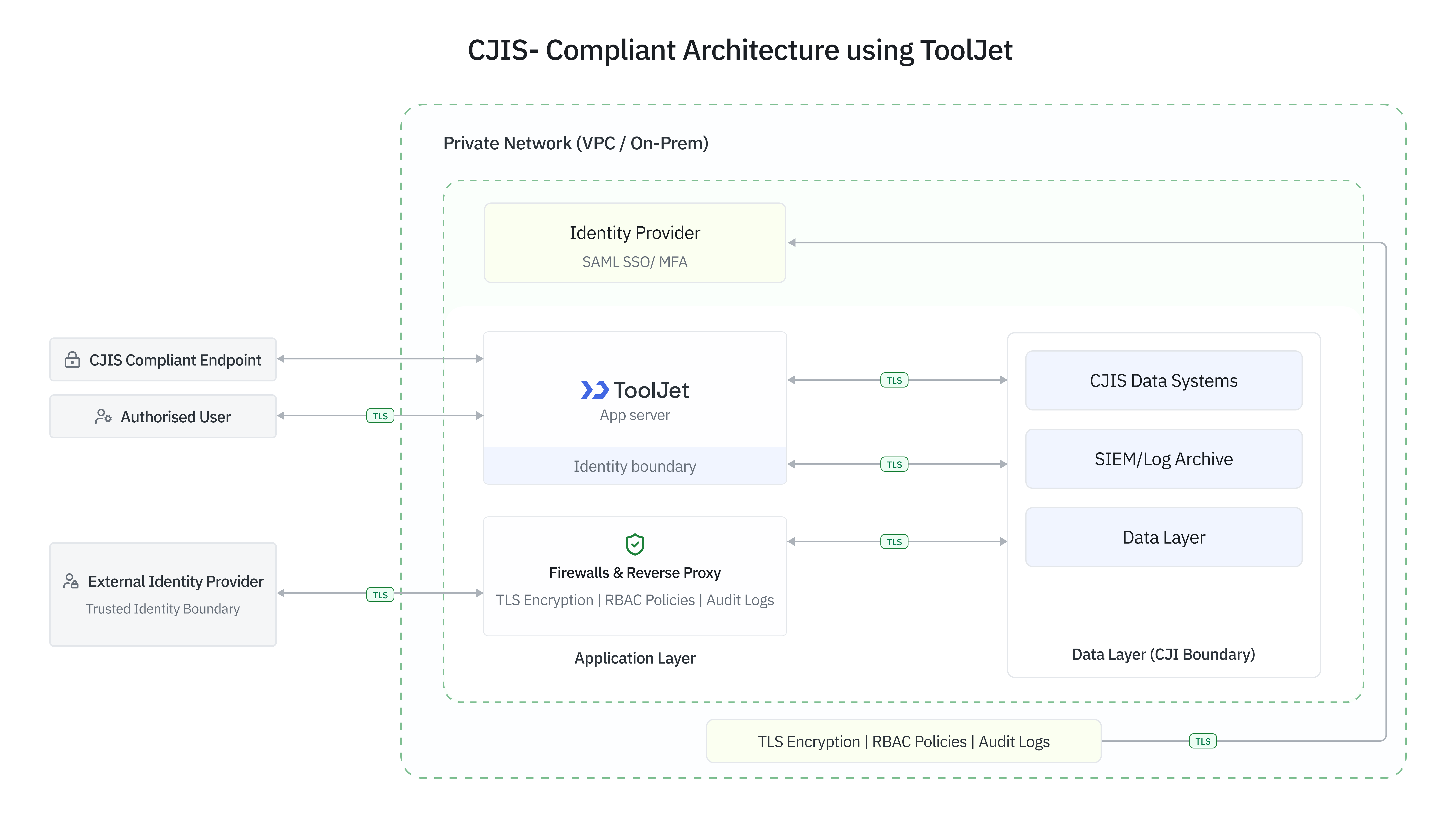
A CJIS-aligned deployment includes a private network layer (VPC or on-premise), controlled access via VPN or zero trust gateways, and no direct public exposure. The application layer runs in containerized environments with hardened configurations, supported by reverse proxies enforcing TLS. Identity is managed through SAML-based SSO with MFA, and observability is handled through SIEM-integrated centralized logging.
Compliance Checklist
Access Control and Authentication
| Control | CJIS Section | Policy Excerpt | Implementation |
|---|---|---|---|
| Unique user identification | 5.6.2.1 | Each user must be uniquely identified. Shared or group accounts are not permitted. | SAML-based SSO |
| Multi-factor authentication | 5.6.2.2 | MFA is required for all remote access to CJI systems. | Enforced via IdP |
| Least privilege access | 5.5.2 | Access must be limited based on job responsibilities and need-to-know. | RBAC configuration |
| Session management | 5.5.6 | Systems must enforce session timeouts and re-authentication. | IdP and proxy policies |
Encryption and Data Protection
| Control | CJIS Section | Policy Excerpt | Implementation |
|---|---|---|---|
| Data in transit | 5.10.1.2 | CJI transmitted outside secure boundaries must use FIPS-validated encryption. | TLS enforcement |
| Data at rest | 5.10.1.1 | CJI stored electronically must be protected using encryption or equivalent safeguards. | Infrastructure encryption |
| FIPS compliance | 5.10.1.2 | Cryptographic modules must be validated under FIPS 140-2 or equivalent. | Environment configuration |
Audit and Accountability
| Control | CJIS Section | Policy Excerpt | Implementation |
|---|---|---|---|
| Activity logging | 5.10.1 | Systems must generate audit records for user access, queries, and admin actions. | ToolJet logs |
| Data access tracking | 5.10.1.3 | Logs must capture who accessed CJI, what actions were performed, and when. | Query logging |
| Log retention | 5.10.4 | Records must be retained per CJIS and organizational requirements. | SIEM integration |
| Log integrity | 5.10.5 | Logs must be protected from unauthorized modification or deletion. | Centralized logging |
Network and System Integrity
| Control | CJIS Section | Policy Excerpt | Implementation |
|---|---|---|---|
| Network isolation | 5.5.1 | CJI must be protected through segmentation and controlled access boundaries. | Private deployment |
| Patch management | 5.7.1.5 | Systems must be regularly updated to address vulnerabilities. | Infrastructure processes |
| Secure configuration | 5.7.1 | Systems must follow industry-recognized hardening standards. | Hardened environments |
Failure Modes to Avoid
CJIS alignment commonly breaks down at the configuration and operational layers, not infrastructure. Watch for these failure modes.
| Failure Mode | Risk | What to Do |
|---|---|---|
| Misconfigured Authorization | Overly broad RBAC exposes CJI beyond intended users | Segment admin and operational roles; review on responsibility changes |
| Incomplete Audit Logging | Gaps in read-operation logs or missing SIEM forwarding make audits impossible | Ensure all query types are logged and forwarded with defined retention |
| Improper Network Exposure | Public-facing ToolJet instances without VPN or zero trust | Route all access through controlled gateways; no direct internet exposure |
| Data Handling Misconfigurations | Caching CJI within the app layer | Operate stateless; disable caching or restrict to non-sensitive data |
| Weak Encryption Enforcement | Non-FIPS modules or outdated TLS across internal connections | Enforce TLS 1.2+ everywhere; validate certificate and module compliance |
| External Service Leakage | CJI sent to external APIs or AI services | Audit all outbound integrations; block unapproved external data flows |
Common Audit Questions
- Where is CJI stored?
CJI should remain within agency-controlled data systems. ToolJet does not persist CJI — data is retrieved in real time from source systems. - Does ToolJet store or cache sensitive data?
ToolJet can be configured to operate without persistent storage. Any caching mechanisms should be disabled or restricted to non-sensitive data. - How is access to CJI controlled?
Through SAML-based authentication, MFA at the identity provider, RBAC policies within ToolJet, and database-level access controls. - How are user actions audited?
User interactions, queries, and API calls are logged and forwarded to SIEM systems such as Splunk, retained and protected per CJIS requirements. - How is access revoked?
Through the identity provider by disabling user accounts or removing group memberships. Changes propagate to ToolJet immediately via SSO enforcement. - What happens during system failure?
ToolJet does not act as a system of record. Failure results in temporary unavailability — no loss of CJI or data integrity impact. - How is data protected in transit and at rest?
TLS is enforced for all communications. Data at rest is protected using infrastructure-level encryption aligned with FIPS 140-2. - Are external integrations restricted?
External services including APIs and AI models should not process CJI unless explicitly approved. All outbound data flows should be audited.