AI Model Performance and Credit Usage
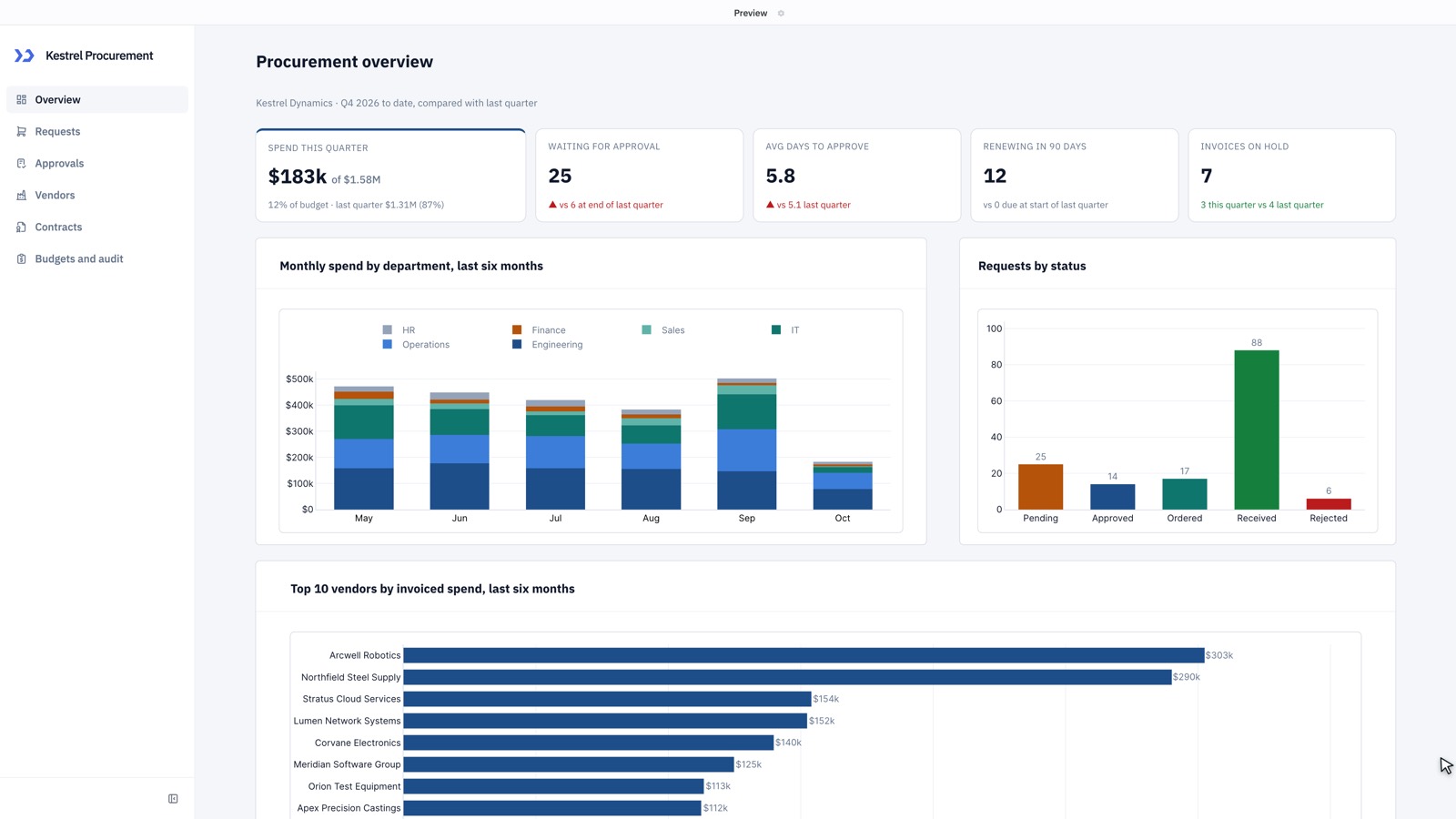
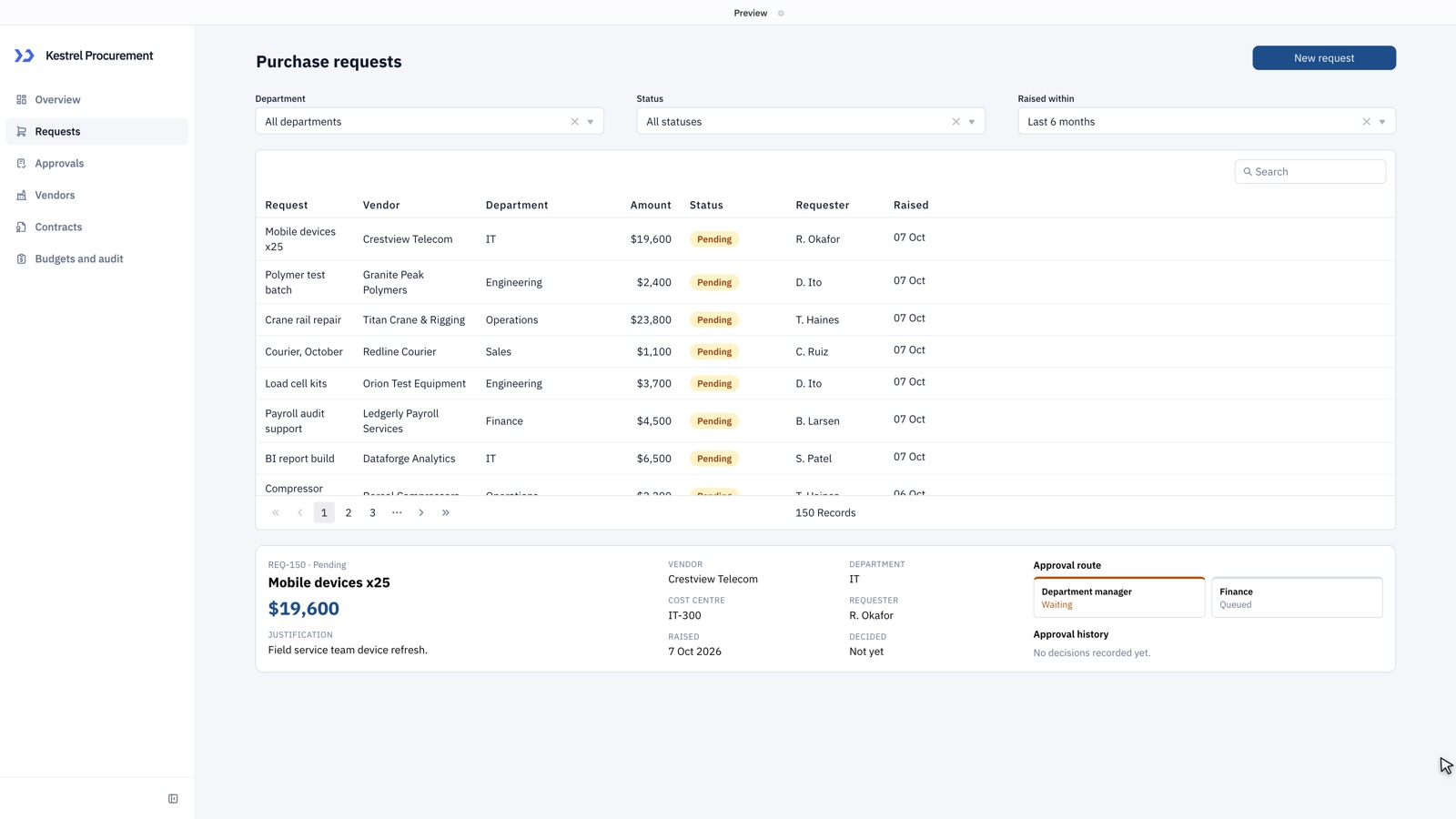
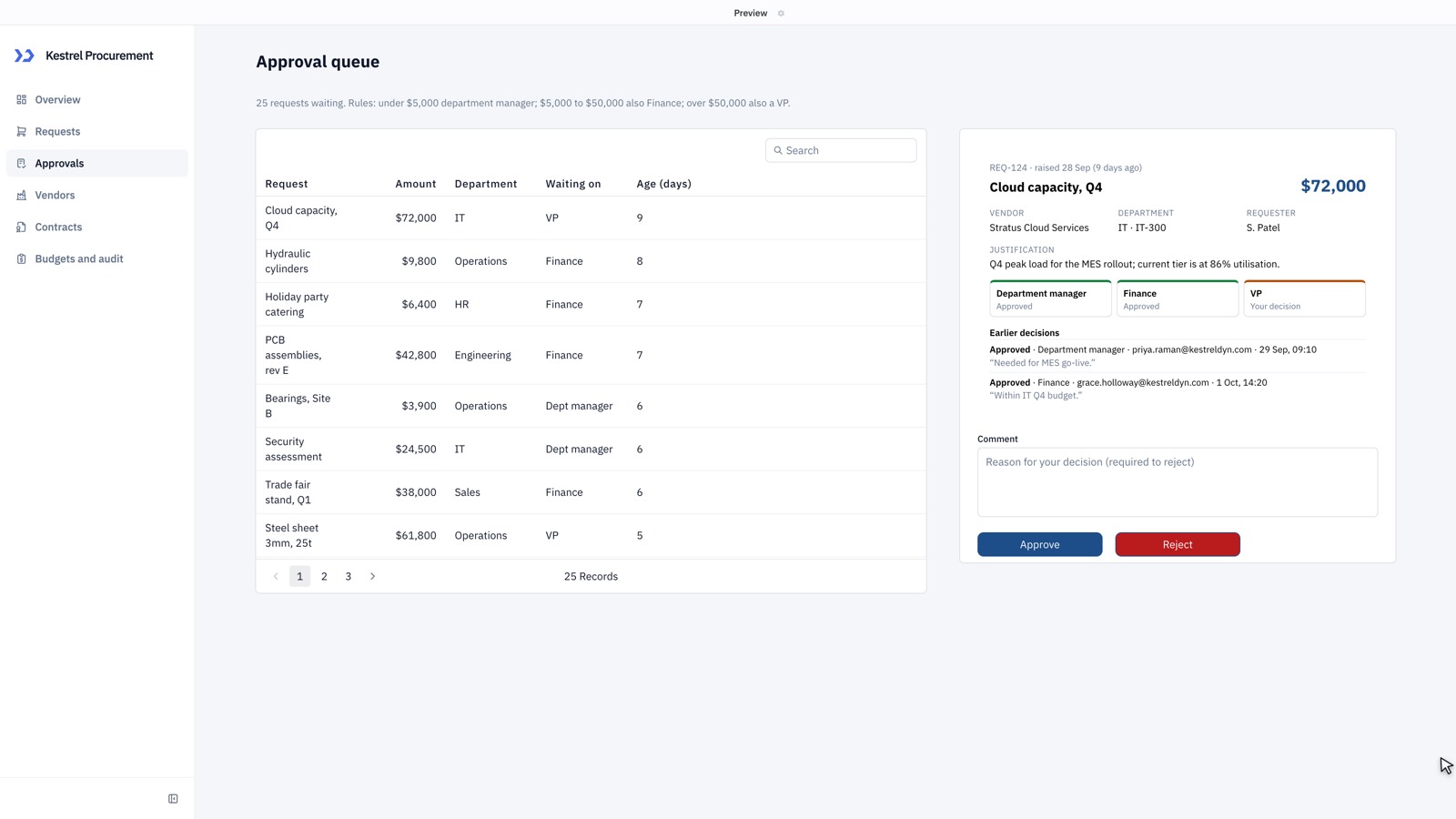
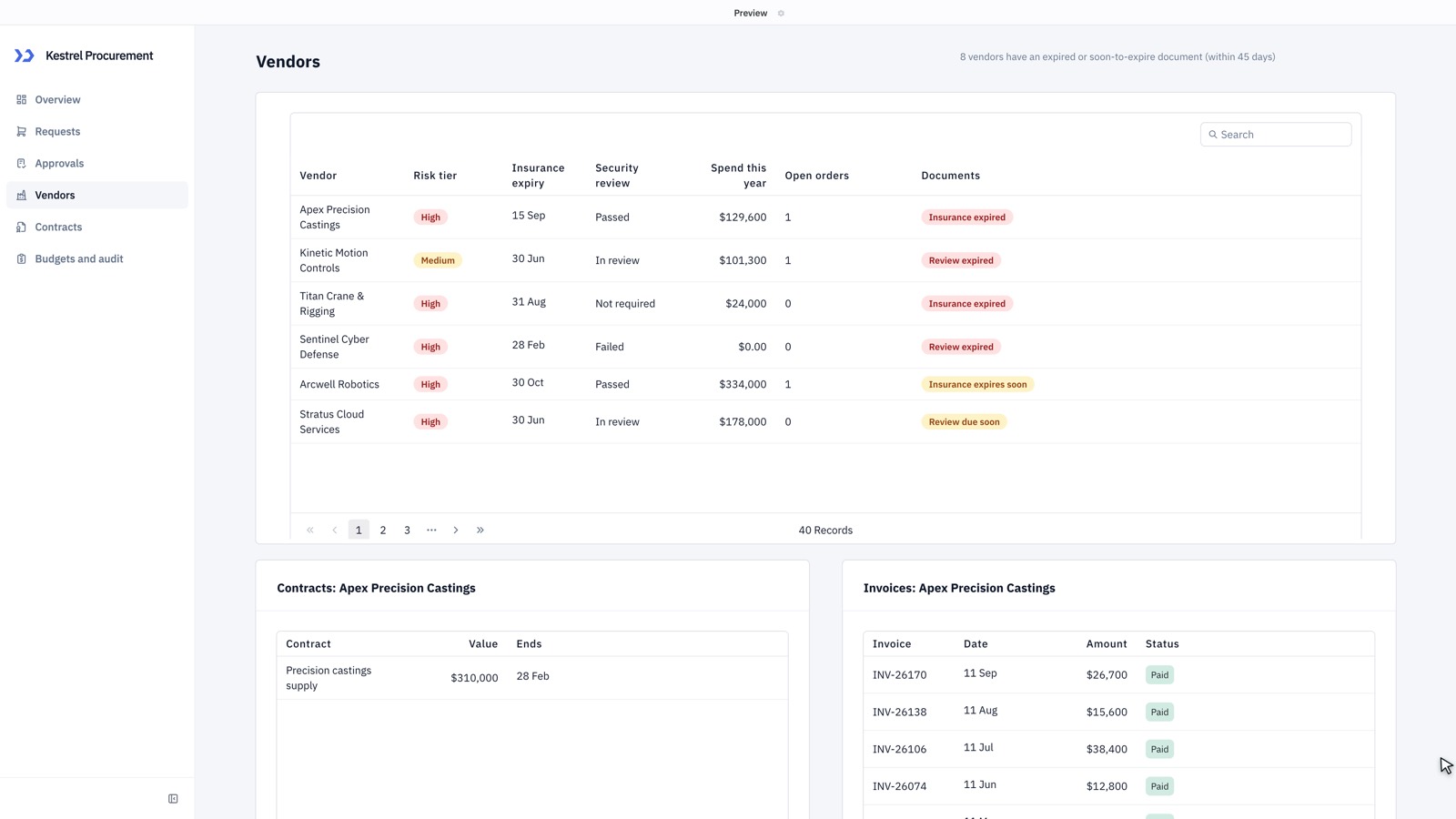
AI models differ in how much of an app they finish, how the app looks, how long the build takes and how many credits it uses. To make the differences easy to see, we gave every model the same prompt: a six-page procurement app for a fictional manufacturer, with approval rules, budgets, vendor compliance, contract renewals and an audit log. Then we compared the apps page by page.
Same-prompt test, 7 October 2026. One build per model, with no retries and no manual fixes. Builds vary from run to run, so treat the results as a guide rather than a guarantee.
Results at a glance
| Claude Opus 5.5 | 22 | 6 | 8 | 445 | 18.9 min |
| Claude Sonnet 5.5 | 21.5 | 6 | 7 | 343 | 19.6 min |
| Claude Fable 5.1 | 21.5 | 6 | 7 | 1,320 | 26.1 min |
| GPT-6.1 Sol | 20.5 | 5* | 6 | 87 | 12.0 min |
| GPT-6 Astra | 20.5 | 4.5* | 7 | 442 | 13.3 min |
| GPT-6 Luna | 20 | 6 | 7 | 21 | 25.9 min |
| Claude Haiku 5.5 | 20 | 6 | 6 | 85 | 14.1 min |
| DeepSeek Flash | 20 | 5.5 | 7 | 37 | 52.0 min |
| Gemini 3.8 Flash | 17.5 | 5 | 6 | 111 | 20.1 min |
| Grok 4.7 | Did not finish |
Select a column heading to sort by it; select it again to reverse the order.
Features counts the 22 things the prompt asked for that were present and working on screen. Actions counts six things we did in each finished app and then checked in its database: raising a request, approval routing, approving and rejecting with a comment, recording a renewal decision, and the request filter and vendor detail. Design is a score out of 10 for layout, consistency and formatting. Credits is what the build used; 1 credit is 1/100 of a US dollar at provider list price.
*GPT-6.1 Sol and GPT-6 Astra built real access control: approvals only work for members of workspace groups the apps expect, such as Finance Approvers and VP Approvers, and renewal decisions only for each contract's owner. Out of the box, with no such groups, their approve, reject and renewal actions stayed disabled and both scored 2.5. The scores shown are after creating the groups the apps expect and adding the user to them, the setup a team would do before using either app. ToolJet's builder did not create these groups or tell the user to.
Grok 4.7 did not finish the app in two attempts: both builds stopped before creating any pages.
Recommended models
| What you're building | Recommended model | What we saw |
|---|---|---|
| A polished, branded app where the look matters | Claude Opus 5.5 | The only model whose one-page design test answered a luxury brief convincingly, for 105 credits in under 4 minutes |
| A one-page tool or dashboard | GPT-6 Luna or GPT-6.1 Sol | A one-page booking desk took 4.8 min and 3 credits with Luna, and 3.8 min and 23 credits with Sol |
| A multi-page business app where completeness matters | Claude Opus 5.5 | The only model to deliver all 22 features of the six-page app, with all 6 actions working and the most polished pages |
| A multi-page app for less | Claude Sonnet 5.5 | 21.5 of 22 features for about three quarters of Opus's credits |
| A multi-page app, fast | GPT-6.1 Sol | 20.5 of 22 features in 12 minutes for 87 credits, the fastest six-page build. Set up the workspace groups the app expects before using its approvals |
| A large app on a tight credit budget | GPT-6 Luna | 20 of 22 features and all 6 actions working for 21 credits, if you can wait about 25 minutes |
| A quick, low-cost first version | Claude Haiku 5.5 | 20 of 22 features in 14 minutes for 85 credits |
| An app on live external data, such as ServiceNow | GPT-6 Luna | In a separate four-page ServiceNow test, Luna got every headline number right for 14 credits |
Compare the screens
Pick a page, then switch between models to see how each one built it. The tabs stay on the same model as you move down the page.
Overview
- Claude Opus 5.5
- Claude Sonnet 5.5
- Claude Fable 5.1
- GPT-6.1 Sol
- GPT-6 Astra
- GPT-6 Luna
- Claude Haiku 5.5
- Gemini 3.8 Flash
- DeepSeek Flash
Requests
- Claude Opus 5.5
- Claude Sonnet 5.5
- Claude Fable 5.1
- GPT-6.1 Sol
- GPT-6 Astra
- GPT-6 Luna
- Claude Haiku 5.5
- Gemini 3.8 Flash
- DeepSeek Flash
Approvals
- Claude Opus 5.5
- Claude Sonnet 5.5
- Claude Fable 5.1
- GPT-6.1 Sol
- GPT-6 Astra
- GPT-6 Luna
- Claude Haiku 5.5
- Gemini 3.8 Flash
- DeepSeek Flash
Vendors
- Claude Opus 5.5
- Claude Sonnet 5.5
- Claude Fable 5.1
- GPT-6.1 Sol
- GPT-6 Astra
- GPT-6 Luna
- Claude Haiku 5.5
- Gemini 3.8 Flash
- DeepSeek Flash
Contracts
- Claude Opus 5.5
- Claude Sonnet 5.5
- Claude Fable 5.1
- GPT-6.1 Sol
- GPT-6 Astra
- GPT-6 Luna
- Claude Haiku 5.5
- Gemini 3.8 Flash
- DeepSeek Flash
Budgets and audit
- Claude Opus 5.5
- Claude Sonnet 5.5
- Claude Fable 5.1
- GPT-6.1 Sol
- GPT-6 Astra
- GPT-6 Luna
- Claude Haiku 5.5
- Gemini 3.8 Flash
- DeepSeek Flash
What each model did well, and where it fell short
Claude Opus 5.5
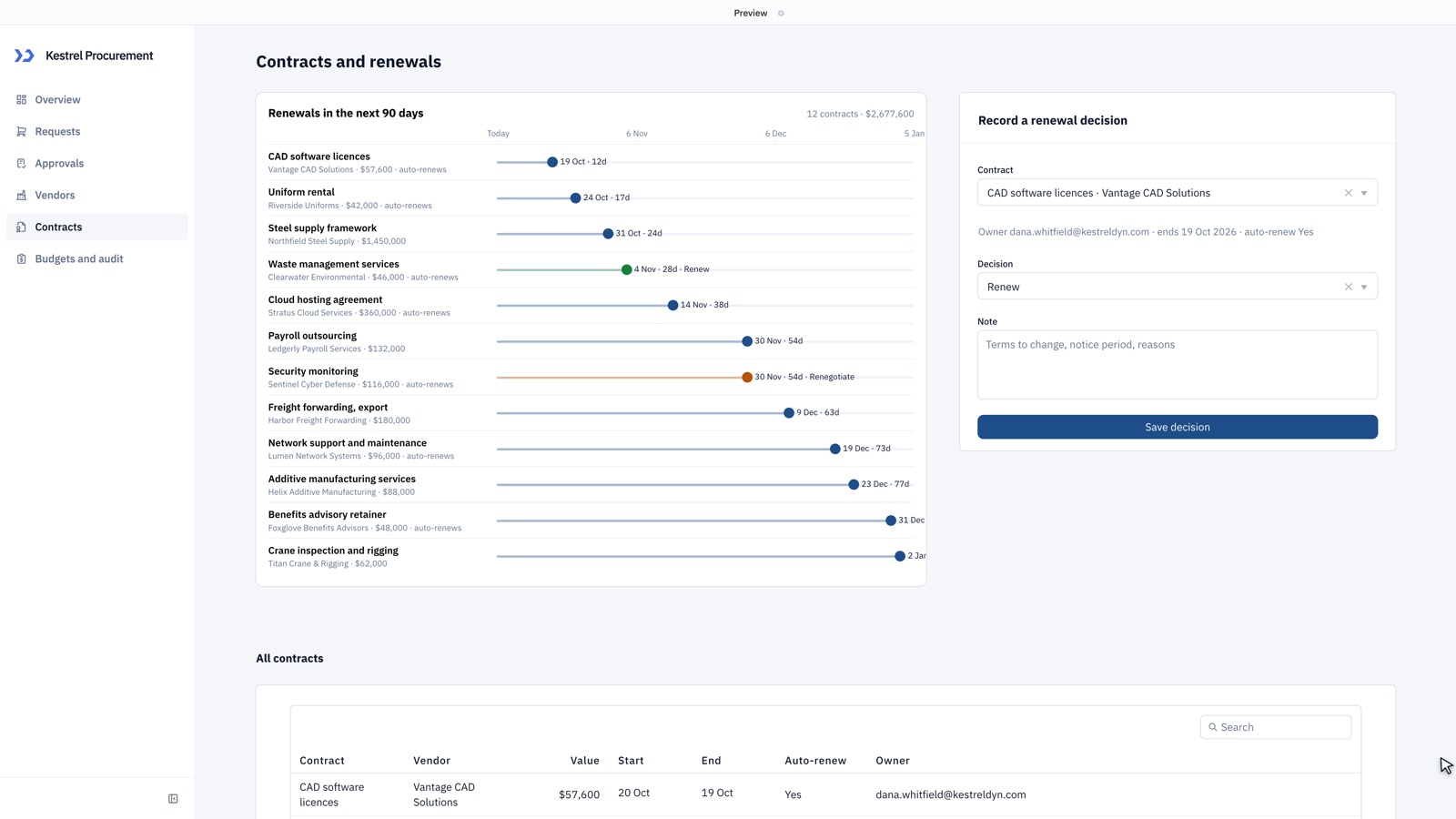
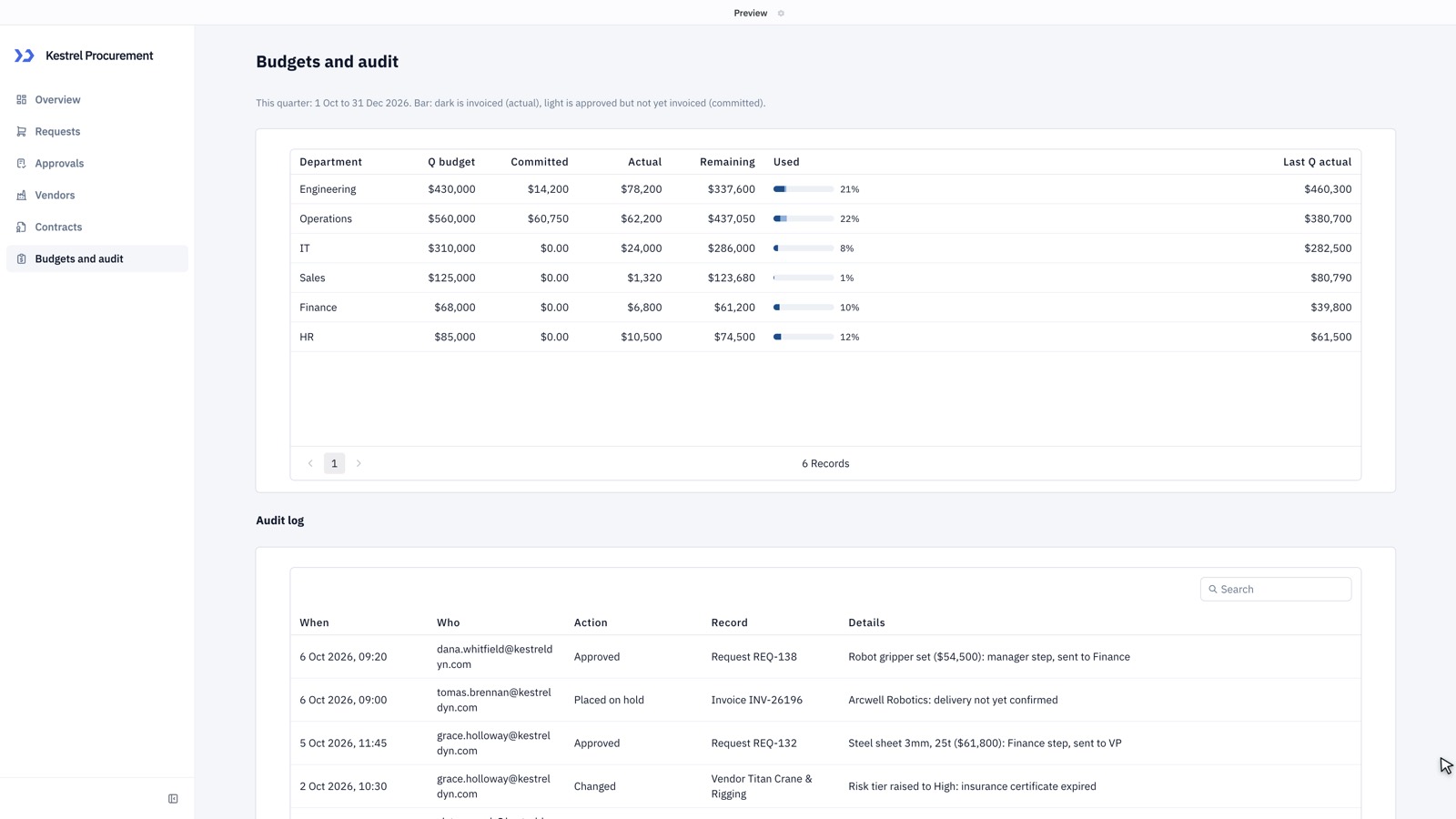
In the end-to-end checks, every action worked: the $62,000 request showed its manager, Finance and VP path, and approvals, rejections and renewal decisions were saved with the user and time. Opus delivered every requested feature, and its numbers agreed with each other across pages. It had the most consistent design: a navy theme on every page, a stacked spend chart with a legend, a designed approval panel and a colour-coded renewal timeline on the Contracts page. Weak points: dates without years ("20 Oct"), short tables with space left under them, and a clipped row on the Requests page.
Claude Sonnet 5.5
All six actions worked end to end, with approvals advancing step by step from manager to Finance. The request detail panel only filled in for the first row. Sonnet built every page and missed only one detail: the Requests table had no requester column (the requester shows in the detail panel). Its Overview was among the best in the test. Weak points: short tables with empty space below, and a contracts list that starts with contracts that already ended.
Claude Fable 5.1
All six actions worked end to end, with routing enforced step by step. Fable matched Sonnet on features, with a well-designed Overview, a consistent navy theme and neatly formatted money, dates and status badges. It was also the most expensive build by a wide margin, at about three times Opus's credits, and one of the slowest. Its first attempt stopped during setup before writing any pages; the result shown is its second attempt. Weak points: some tables fill only part of their card or clip their last row, and the contracts table has no start date column.
GPT-6.1 Sol
Sol built approval controls for workspace groups the app expects (department managers, Finance approvers and VP approvers) and limited renewal decisions to each contract's owner. Out of the box those groups did not exist, so approve, reject and renewal stayed disabled. After creating the groups, rejecting worked, and a Finance approver could assign a contract to themselves and record the renewal decision; approvals were recorded, but a request never reached Approved because each step jumped straight to Complete. Sol was the fastest build and one of the best values. All six pages worked, with a consistent indigo theme and charts with legends. Weak points: no request detail panel on the Requests page, contract dates without years, and committed spend showing $0 for most departments.
GPT-6 Astra
Like Sol, Astra tied approvals to workspace groups and renewals to contract owners. Out of the box those actions stayed disabled. After creating the groups, approvals moved correctly from manager to Finance to VP, each recorded in the audit log, and rejecting worked; renewal decisions still need the named contract owner to sign in, since the app offers no way to reassign an owner. Astra built all six pages in 13 minutes, with a strong Overview: five KPIs, each compared with last quarter, and three charts with legends. Weak points: the Requests and Approvals pages show no detail panel or approve and reject controls until a row is selected, several tables stop at five rows with empty space below, two vendor flag chips are cut off, and the monthly spend chart shows spend for only two departments.
GPT-6 Luna
All six actions worked end to end, and approval routing was enforced step by step. Each decision wrote its audit entry twice. Luna built a complete, well-themed app for a fraction of the credits of any other model, but took about 26 minutes, longer than every model except DeepSeek. Weak points: "average days to approve" showed 0.0, most vendors showed no spend, and the contracts table left out start dates and owners.
Claude Haiku 5.5
All six actions worked end to end, with approvals moving from manager to Finance to VP. Haiku built all six pages quickly. Weak points: the spend KPI on the Overview read $0, dates appeared in raw ISO format (2026-10-06T13:00:00-07:00), the app's theme was not applied (default blue buttons), and the Vendors page placed its detail panels above the vendor list.
DeepSeek Flash
Five of six actions worked end to end; a single approval closed the whole three-step route, and the vendor detail window opened empty. DeepSeek built a complete app with a consistent teal theme for very few credits, and its Contracts page, with renewals grouped by month, was one of the best in the test. It was by far the slowest build, at 52 minutes, because it writes very long responses. Weak points: the spend card showed a $0 budget, actual spend read $0 for every department, and the approval queue offered a single Decide button with no visible comment field.
Gemini 3.8 Flash
Five of six actions worked end to end, but a single approval skipped the Finance and VP steps, decisions wrote no audit entries, and vendor contracts and invoices stayed empty after selecting a vendor. Gemini's Overview and Contracts pages were strong, and its approval queue showed exactly which approvers each request needed. Weak points: the Requests page had no filters, several tables showed only three to five rows before a pager, the monthly spend chart had no legend, and the sample data used real company names as vendors.
Design-focused test: a one-page app
The six-page app tests completeness. To see how much design sense each model brings when it is given freedom, we also gave every model a short, loosely worded prompt for a single page, with a brief that asks for a luxurious look rather than spelling out the layout.
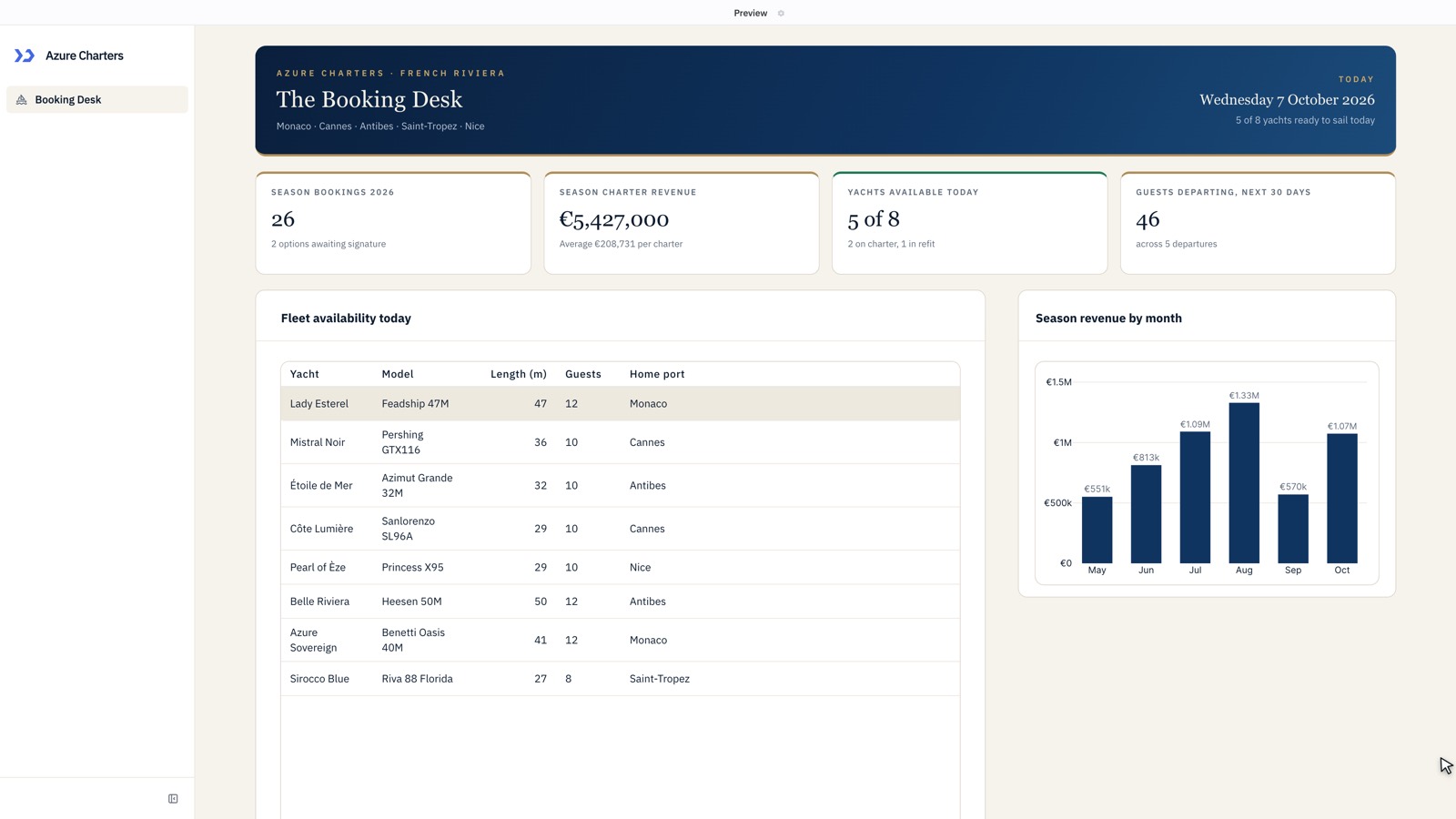
Build a one-page booking desk for Azure Charters, a yacht charter company on the French Riviera with a fleet of eight yachts. The charter team keeps it open all day: it should show which yachts are available, the upcoming charters with guests, dates and destinations, the crew on each yacht, and this season's bookings and revenue at a glance. Fill it with realistic sample data. The design should feel ultra-luxurious and modern: crisp, nautical and elegant, the kind of screen a superyacht company would be proud to show its clients.
| Claude Opus 5.5 | 7.5 | 105 | 3.6 min |
| GPT-6 Astra | 7 | 181 | 5.4 min |
| Claude Fable 5.1 | 6.5 | 391 | 7.5 min |
| Claude Haiku 5.5 | 5.5 | 4 | 2.2 min |
| DeepSeek Flash | 5.5 | 14 | 43.1 min |
| GPT-6.1 Sol | 5 | 23 | 3.8 min |
| Claude Sonnet 5.5 | 5 | 59 | 2.5 min |
| GPT-6 Luna | 4.5 | 3 | 4.8 min |
| Gemini 3.8 Flash | 3.5 | 43 | 6.8 min |
| Grok 4.7 | Did not finish |
Select a column heading to sort by it; select it again to reverse the order.
Only three models clearly answered the brief. Claude Opus 5.5 produced the one page that reads as luxury: an ivory canvas, serif display type, gold hairlines and a revenue chart. GPT-6 Astra replaced the usual dark header with a refined wordmark and a grid of yacht cards, and Claude Fable 5.1 used gold-edged cards and an elegant banner. The other models built tidy but generic dashboards: a dark header band above white tables. If the look of an app matters, choose the model for it.
The design scores come from a reviewer who graded the nine screens without knowing which model built which.
- Claude Opus 5.5
- GPT-6 Astra
- Claude Fable 5.1
- Claude Haiku 5.5
- DeepSeek Flash
- GPT-6.1 Sol
- Claude Sonnet 5.5
- GPT-6 Luna
- Gemini 3.8 Flash
Models not included in this test
ToolJet's model picker offers more models than this page compares. We tested the latest model from each family. The Claude 5.5 and GPT-6 models build better apps than the Claude 5 and GPT-5.6 models they replace, and cost less, so the older models are not included.
How we tested
Every model received the prompt below, unchanged, through the ToolJet AI app builder. Each build ran once, from the prompt to the builder's final message, with no follow-up prompts.
We then opened every page of each app and checked it against a 22-item list taken from the prompt: five KPIs with comparisons and three charts on the Overview; the request table, filters, form and detail panel; the approval queue, approval rules, approve and reject with a comment, and recorded decisions; the vendor list, compliance flags and vendor detail; the contract list, renewal timeline and renewal decision; and the budget comparison and audit log. Each item scored 1 if it was present, populated and plausible, 0.5 if it was present but partly broken, and 0 if it was missing. Design was scored separately, out of 10.
We then used each finished app the way a procurement team would, through its own screens, and checked the result in the app's database: we raised a $62,000 request and checked its approval route, approved one request and rejected another with a comment, recorded a contract renewal decision, and used the request filter and vendor detail. Each of these six actions scored 1 if it worked and was saved correctly, 0.5 if it partly worked, and 0 if it failed. The tester was signed in as a workspace admin. Two apps, built by GPT-6.1 Sol and GPT-6 Astra, limited approvals to workspace groups that did not exist; for those two we also created the groups each app expected, added the tester to them and repeated the approval, rejection and renewal checks. The table shows those results, marked with an asterisk.
The design-focused test used the one-page yacht charter prompt shown in that section, built once by every model on 7 October 2026 and graded blind for design. The ServiceNow row in Recommended models draws on a separate same-prompt test: a four-page IT operations app on live ServiceNow data, built on 6 October 2026.
| Measure | What it represents |
|---|---|
| Features | Requested features that were present and working on screen, out of 22 |
| Design | Layout, consistency, formatting and readability, out of 10 |
| Actions | Actions that worked when used in the app and checked in its database, out of 6 |
| Credits | AI usage at provider list price; 1 credit = 1/100 of a US dollar |
| Build time | Wall-clock time from sending the prompt to the builder's final message |
The prompt
Build a procurement app for Kestrel Dynamics, a manufacturing company with 3,000 employees across four sites and six departments (Engineering, Operations, IT, Sales, Finance and HR). Store everything in a database the whole team shares and fill it with realistic sample data: the six departments with quarterly budgets, 40 vendors, about 150 purchase requests from the last six months, 30 contracts and about 200 invoices.
Six pages with a left sidebar:
1. Overview: KPI cards for spend this quarter against budget, requests waiting for approval, average days to approve, contracts renewing in the next 90 days and invoices on hold, each compared with last quarter. Charts for monthly spend by department over the last six months, requests by status, and the top 10 vendors by spend.
2. Requests: a searchable table of purchase requests with department, vendor, amount, status and requester, filterable by department, status and date. A form to raise a new request: item, vendor, amount, cost centre and justification. Selecting a request shows its details and approval history.
3. Approvals: the queue of requests waiting for a decision. The approval rules: under $5,000 needs the department manager; $5,000 to $50,000 also needs Finance; over $50,000 also needs a VP. Approvers can approve or reject with a comment, and each decision is recorded with the signed-in user's name and the time.
4. Vendors: a list with risk tier, insurance expiry, security review status, spend this year and open orders. Vendors with an expired or soon-to-expire document are flagged. Selecting a vendor shows their contracts and invoices.
5. Contracts: contracts with vendor, value, start and end dates, auto-renew and owner, with the next 90 days of renewals shown as a timeline. The owner can record a renewal decision: renew, renegotiate or end.
6. Budgets and audit: each department's budget against committed and actual spend this quarter, and an audit log of every approval, rejection and change, showing who did it and when.
Design: a clean, professional look suited to a finance and operations team, easy to read on a laptop.