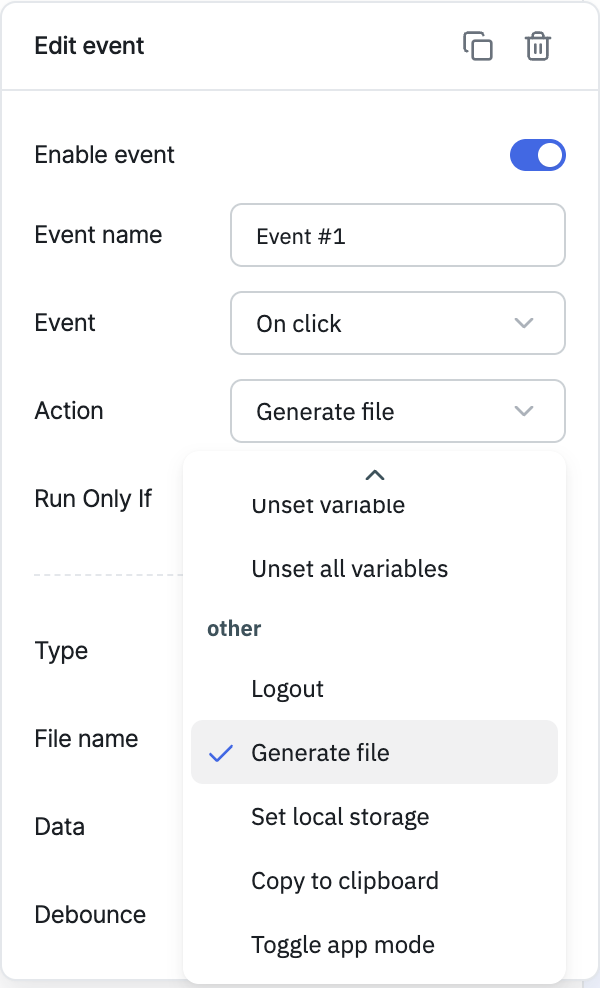
Generate file
The Generate file action constructs a CSV, text, or PDF file on the fly and lets the user download it.
Configuration
| Parameter | Description | Default |
|---|---|---|
| Type | Type of file to be generated. Types: CSV, Text and PDF | — |
| File name | Name of the file to be generated | — |
| Data | Data that will be used to construct the file. Its format will depend on the file type, as specified in the following section | — |
| Debounce | Time in milliseconds to wait before executing the action | Empty (no delay) |
CSV Data Format
To use the CSV file format, the data field should contain an array of objects. ToolJet assumes that the keys in each object are the same and represent the column headers of the CSV file.
Example:
{
  {
    [
      { name: "John", email: "john@tooljet.com" },
      { name: "Sarah", email: "sarah@tooljet.com" },
    ];
  }
}
Using the above code snippet will generate a CSV file with the following content:
name,email
John,john@tooljet.com
Sarah,sarah@tooljet.com
Text Data Format
To use the Text file format, the data field should contain a string.
If you want to generate a text file based on an array of objects, you need to stringify the data before providing it.
For example, if you are using the table component to provide the data, you can enter {{JSON.stringify(components.table1.currentPageData)}} in the Data field.
PDF data format
The PDF data format supports two types of input: either a string or an array of objects. When using an array of objects, the resulting PDF will display the data in a tabular format with columns and rows. On the other hand, if a string is provided, the generated PDF will consist of plain text.
Triggering via RunJS
actions.generateFile('<fileName>', '<fileType>', '<data>');
fileName is the name to give the file (string), fileType is one of csv, plaintext, or pdf, and data is the data to store in the file.
// CSV
actions.generateFile('csvfile1', 'csv', '{{components.table1.currentPageData}}');

// Text
actions.generateFile('textfile1', 'plaintext', '{{JSON.stringify(components.table1.currentPageData)}}');

// PDF
actions.generateFile('pdffile1', 'pdf', '{{components.table1.currentPageData}}');
For a full quick-reference of all actions' RunJS syntax, see Run Actions from RunJS.