Multi-Environment
Environments in ToolJet help manage different stages of application development, ensuring smooth transitions between development, testing, and production. This guide covers what environments are, their purpose, and how they function in ToolJet.
Environments make it easier to develop and deploy applications without disrupting production. They keep changes isolated, so testing and debugging can happen without affecting live users. Teams can collaborate more efficiently, as different environments allow them to work independently.
What are Environments?
An environment in ToolJet represents a separate configuration space where applications, data sources, and constants can be defined and managed.
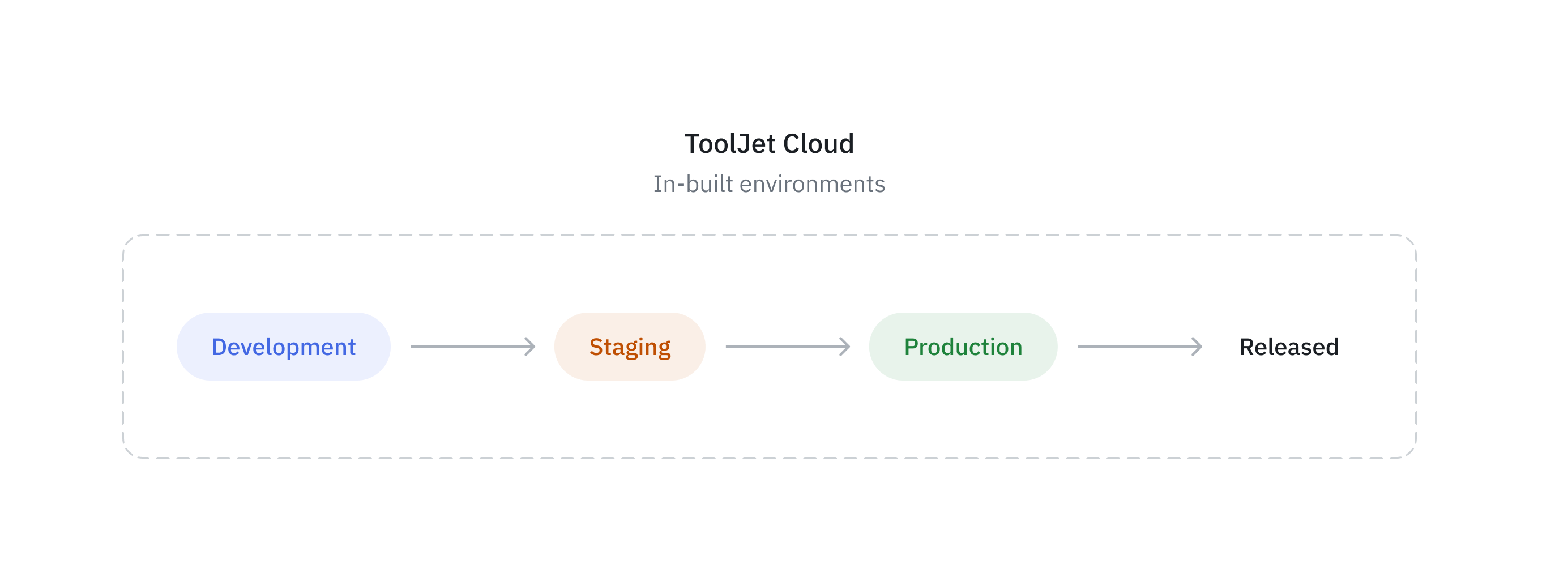
By default, ToolJet provides three environments:
- Development: The Development environment is where application development and initial testing take place. It is a dedicated space for ToolJet developers to build, configure, and experiment with application features. Changes in this environment do not affect live users, allowing for frequent updates and debugging.
- Staging: The Staging environment acts as a pre-production space where applications undergo thorough testing before deployment. It closely resembles the Production environment and helps ensure that all features, performance, and security aspects function as expected. Teams such as QA and product managers use this environment to validate and approve changes before releasing them to end-users.
- Production: The Production environment is the final, live version of the application where end users interact with it. This environment is stable and optimized for performance after thorough testing in the Development and Staging environments.
Multi-Environment Support in ToolJet
ToolJet provides environment management across different components:
Applications
Each application has development, staging, and production environments. Developers build the application in the development environment and then move it to staging for testing. Your testing team can review the application in staging, and once it's thoroughly tested, you can promote it to production and release it to your end users.
Data Sources
Data sources can be configured separately for each environment, allowing applications to connect to different databases or APIs depending on the environment. This ensures secure and structured access to relevant data during each stage of development.
Constants
Constants such as API keys, credentials, or other configuration variables can be defined uniquely for each environment. This helps maintain security and prevents misconfigurations across different deployment stages.
Application Life cycle
The application lifecycle in ToolJet involves managing applications across different environments development, staging, and production. You can build the application in development environment and promote it to staging for testing. After testing you can promote it to production and release the app for your end-users.
You can configure data sources and constants for each environment, and ToolJet will automatically use the appropriate ones based on the target environment.
- Development – Developers build and test the application in the ToolJet app builder.
- Staging – The testing or product team validates requirements and tests the application using staging data. Apps and queries cannot be edited in this environment.
- Production – After thorough testing in staging, the application is promoted to production. This can serve as a pre-release environment where you test with production data and constants before releasing the application to end users. Refer to Release documentation to learn more.
Environment Permissions
Environment Access Permission
Admin can configure environment access for user groups or roles from the Granular Access Control page.
Environment access determines the environment the user can access the app, while the user’s application permission (Edit or View) determines what they can do inside that environment.
Final access is decided by both, App Permission (Edit/View) and Environment Access.
| Environment | Edit Permission | View Permission |
|---|---|---|
| Development Environment | User can view and edit the application in Development Environment | User can preview the application in Development Environment but cannot edit the application |
| Staging Environment | User can access the application in Staging Environment, run queries from the Query Panel, and inspect the application using ToolJet’s Inspector tool | User can preview the application in Staging Environment only |
| Production Environment | User can access the application in Production, run queries from the Query Panel, and inspect the application using ToolJet’s Inspector tool | User can preview the application in Production Environment only |
| No Environment | User can open the application in any environment | User can preview the application in any environment |
Permission Priority
A single group can have multiple permissions assigned for an application and its environments. When this happens, ToolJet combines these permissions, and Edit permission always takes priority over View permission.
This means:
- If a group provides both View and Edit permission for an app, the user gets Edit permission.
- If a group provides Edit access in at least one environment and View access in others, the user receives Edit-level permission for the application overall and can access all environments assigned to that group.
- If no environments are specified, the permission applies to all environments by default.
Examples
The following examples illustrate how different combinations of application permissions, environment access, and role defaults determine a user’s final permissions:
-
Builder with multiple permissions in the same group
If a user receives both View and Edit permissions for an application within the same group, Edit takes priority. If the environment access is explicitly limited to Staging, the user can open the app in Staging and run queries, but cannot edit the UI or queries. They will not have access to Development or Production. -
Builder with overlapping permissions across groups
When a user belongs to multiple groups, ToolJet combines permissions. Edit overrides View, and environment access becomes the union of environments assigned across groups. If Staging is the only specified environment, the user can open and run queries in Staging but cannot access other environments. -
Builder (default role) with no environment specified
If no environment access is explicitly defined, the permission applies to all environments by default. A Builder with Edit permission can edit the application in Development and can open and run queries in Staging and Production, but cannot edit UI or queries in those environments. -
End User (default role)
An End User has View permission by default and can access only the released Production application. They cannot access Development or Staging unless explicitly granted preview access. -
End User with explicit preview access
If an End User is granted access to Development and Staging environments, they can preview the application in those environments but cannot edit it. They will not have access to Production unless the app is released to them.
Promote Application Permission
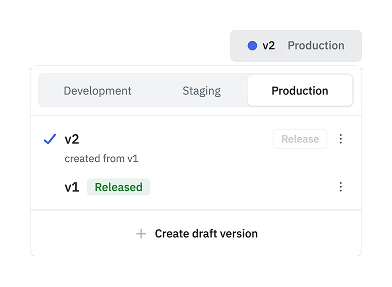
Admin can configure the Promote Application permission from the Permissions page. This disables the Promote button for users who do not have the required permission, allowing only authorized roles, such as team leads, to promote the application from one environment to another. In the example below, the user does not have permission to perform a release. Therefore, the Release button is disabled and cannot be used.
Version Actions by Environment
Each environment has a different impact on your application. Please refer the following table for details.
| Action | Development | Staging | Production |
|---|---|---|---|
| Edit versions | ✅ (only draft versions) | ❌ | ❌ |
| Rename versions | ✅ (only draft versions) | ❌ | ❌ |
| Delete versions | ✅ | ✅ | ✅ |
| Create new versions | ✅ | ✅ | ✅ |
Checkout the Environment-Example guide to learn about multi-environment in ToolJet with a practical example.