OpenID Connect
In ToolJet, you can use the group synchronization feature to automatically update user roles and custom groups from the identity provider. This functionality enables centralized access management, reduces the risk of manual errors, enhances security, and simplifies the user onboarding process.
Group synchronization occurs at every login. Users must log out and log back in for changes to be reflected. Manual editing of groups in ToolJet is not recommended as changes will be overwritten upon subsequent logins.
Whenever a user is deleted from the Identity Provider, admins needs to manually archive the user in ToolJet. Otherwise, if password login is enabled, the user can still log in using their password.
If the license expires or downgrades to a plan without group sync, both SSO and group sync features will be disabled. Users will need to log in via alternative SSO methods or email/password. If the license limit is reached, new users will not be allowed to log in.
Group Mapping
Group mapping in ToolJet follows these principles:
- Default 1:1 mapping based on group names (case-sensitive).
- Custom group mapping can be configured.
- Users without a matching group are assigned to the end-users group.
Group Mapping Scenarios
| Groups in IdP | Groups in ToolJet | Role Mapping Settings | Result |
|---|---|---|---|
| admin, builder, end-user | Exists (User Roles) | None | User is assigned with the corresponding user role. |
| engineers | Exists | None | User added to engineers custom group and assigned either end-users or builders user role based on permissions. |
| engineers | engineers - Doesn't exist developer - Exists | engineers → developers | User added to developers custom group and assigned builder or end-user role based on permissions. |
| admin, developers | Exists | None | User added to developers custom group and assigned admin user role. |
| no group | N/A | None | User added to end-users default group. |
Configure OIDC Group Sync in ToolJet
To set up OIDC group synchronization in ToolJet follow these steps:
- Navigate to the Workspace Settings > Workspace Login Tab.
(Example URL:https://app.corp.com/nexus/workspace-settings/workspace-login) - Click on the OpenID Connect under the SSO section.
- Setup the OpenID Connect SSO by following this guide.
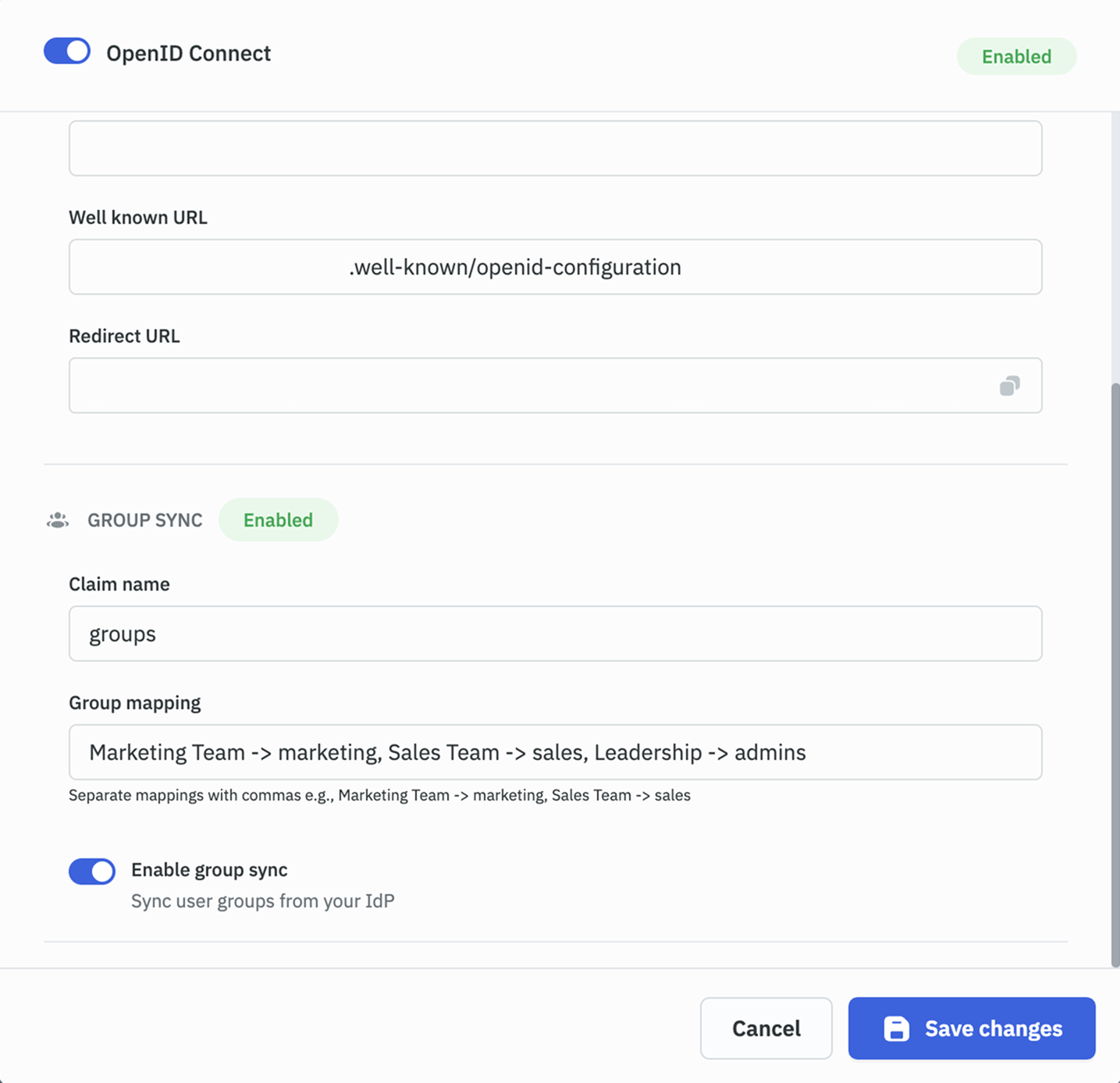
- Enable the Group Sync toggle and provide the following information:
- Claim name: Enter the name of the claim in the OIDC token that contains group information (e.g.,
groups). For a nested claim, enter its dot path, such ascustom_attributes.groups. - Delimiter: Enter the character that separates group names when the claim is sent as a single string (e.g.,
,or;). Enterspacefor a single space. Leave it empty for array claims. - Group mapping: Configure how IdP groups map to ToolJet groups. Use the format:
For example:
IdP Group -> ToolJet Group, Another IdP Group -> Another ToolJet GroupMarketing Team -> marketing, Sales Team -> sales
Group Claims Sent as a String
Most identity providers send groups as an array, such as ["engineering", "marketing"]. Some send them as a single string instead, such as "engineering,marketing". To sync groups from a string claim, set the Delimiter field to the character that separates the group names.
| Claim value | Delimiter | Groups synced |
|---|---|---|
["engineering", "marketing"] | Empty | engineering, marketing |
"engineering,marketing" | , | engineering, marketing |
"engineering; marketing" | ; | engineering, marketing |
"engineering marketing" | space | engineering, marketing |
"engineering,marketing" | Empty | None |
["engineering", "marketing"] | , | None |
ToolJet trims spaces around each group name and drops empty or duplicate entries. It checks the user info response, then the ID token, then the access token, and uses the first claim in the expected format.
Set the Delimiter with an Environment Variable
On self-hosted ToolJet, the delimiter can also be set with the OIDC_GROUPS_DELIMITER environment variable. When set, it overrides the Delimiter field in every OIDC group sync configuration on the instance.
OIDC_GROUPS_DELIMITER=,
If the delimiter isn't picked up from the environment variable, wrap the value in quotes, such as OIDC_GROUPS_DELIMITER="#". The Delimiter field in the UI doesn't need quotes.
Nested Group Claims
Some identity providers send the groups claim inside another object instead of at the top level of the token:
{
  "custom_attributes": {
    "groups": "engineering,marketing"
  }
}
To read a nested claim, enter its dot path in Claim name, such as custom_attributes.groups. If the nested value is a string, also set the Delimiter field as described in Group Claims Sent as a String.
- A top-level claim named exactly
custom_attributes.groupstakes priority over the nested path. - If any part of the path is missing, no groups are synced from the claim.
Custom Scopes
OIDC providers often allow requesting additional custom scopes beyond the standard ones. These scopes define what information or permissions an application can access, such as groups, roles, or directory access permissions. ToolJet includes the following scopes by default:
OIDC_CUSTOM_SCOPES=openid, email, profile
ToolJet automatically adds the groups scope when all of the following are true:
- Group synchronization is enabled.
- No custom scopes are configured.
- The identity provider supports
groups: it lists the scope underscopes_supportedin its discovery document, or publishes noscopes_supportedlist.
OIDC_CUSTOM_SCOPES=groups
This prevents a login from failing at identity providers that don't support the groups scope.
Configuration
You can override or extend the default scopes using the OIDC_CUSTOM_SCOPES environment variable in the self-hosted version of ToolJet.
Set scopes in your .env file using comma-separated values:
OIDC_CUSTOM_SCOPES=groups,roles,offline_access
Provider-Specific Examples
| Provider | Required Scope | Extended Scope Example |
|---|---|---|
| Okta | OIDC_CUSTOM_SCOPES=groups | OIDC_CUSTOM_SCOPES=groups,roles |
| Azure Entra ID (Microsoft) | OIDC_CUSTOM_SCOPES=Group.Read.All | OIDC_CUSTOM_SCOPES= Group.Read.All,Directory.Read.All |
- Custom scopes must be supported by your OIDC provider.
- Ensure your application has the necessary permissions configured in the identity provider for the specific scopes.