Bring Your Own Key (BYOK)
Availability: BYOK is available on Enterprise plans for both ToolJet Cloud and Self-hosted deployments.
Bring Your Own Key (BYOK) allows you to configure an API key from a supported LLM provider directly within ToolJet's settings. Instead of routing AI requests through ToolJet's managed credentials and consuming ToolJet AI credits, ToolJet will authenticate all AI requests using your own key.
This is useful when you want direct control over your AI usage and costs. Since the API key belongs to your LLM provider account, you get full visibility into consumption, can set your own rate limits and spending caps, and are billed directly by the provider, independently of your ToolJet subscription.
BYOK does not require any infrastructure changes. Requests continue to be processed via ToolJet Managed AI Server, with the only difference being the credentials used to authenticate them.
AI requests still route through ToolJet Managed AI Server when using BYOK. If your organization requires that no data leaves your own infrastructure, refer to ToolJet AI Enterprise.
This means:
- Cost control: Usage is billed directly to your LLM provider account. ToolJet does not charge ToolJet AI credits for these requests.
- Visibility: You can monitor usage and set spending limits through your LLM provider's dashboard.
- Compatibility: BYOK works on both ToolJet Cloud and Self-hosted deployments; no infrastructure changes are required on your end.
Prerequisites
Anthropic
To use Anthropic as your LLM provider, an Anthropic API key is required. You can follow the official Anthropic documentation to generate the API key.
Grok
To use Grok as your LLM provider, a Grok API key is required. You can generate one from the xAI console.
OpenAI
To use OpenAI as your LLM provider, an OpenAI API key is required. You can generate one from the OpenAI platform.
OpenRouter
To use OpenRouter as your LLM provider, an OpenRouter API key is required. You can generate one from openrouter.ai/keys. Unlike the other providers, OpenRouter also lets you pick the exact model to use, see Selecting an Exact Model.
ToolJet lists only the OpenRouter models that support the tools, response_format, and structured_outputs parameters and have a context window of at least 200,000 tokens. The ToolJet server fetches this list from https://openrouter.ai/api/v1/models, so on self-hosted deployments it needs outbound access to openrouter.ai.
Configuring Your API Key via UI
- Navigate to Settings → LLM key. On self-hosted deployments this is an instance setting available to super admins; on ToolJet Cloud, workspace admins can access it.
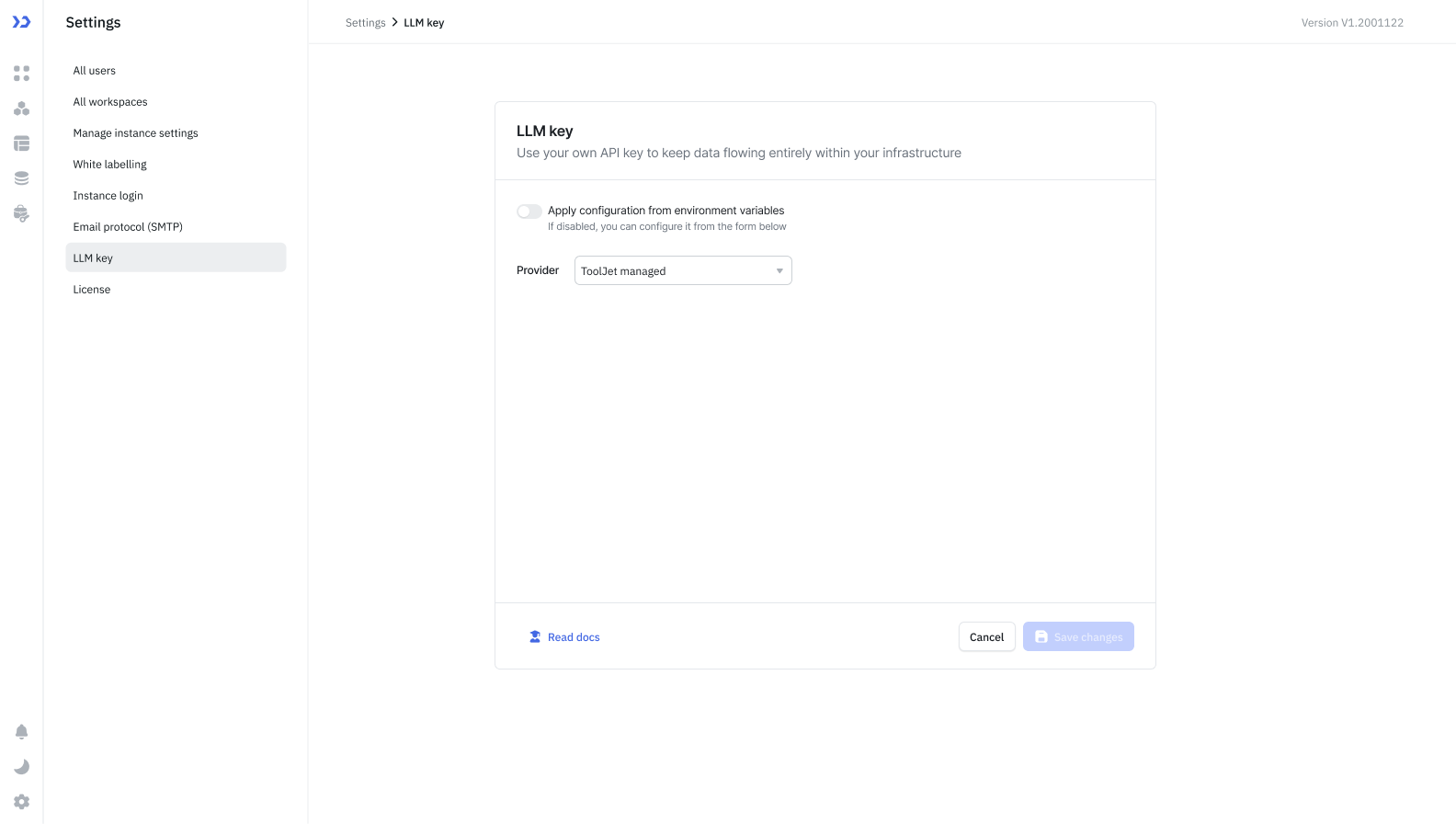
- Select the provider you want to use: ToolJet managed, Anthropic, Grok, OpenAI, or OpenRouter. By default "ToolJet managed" will be selected which utilizes the ToolJet AI Credits.
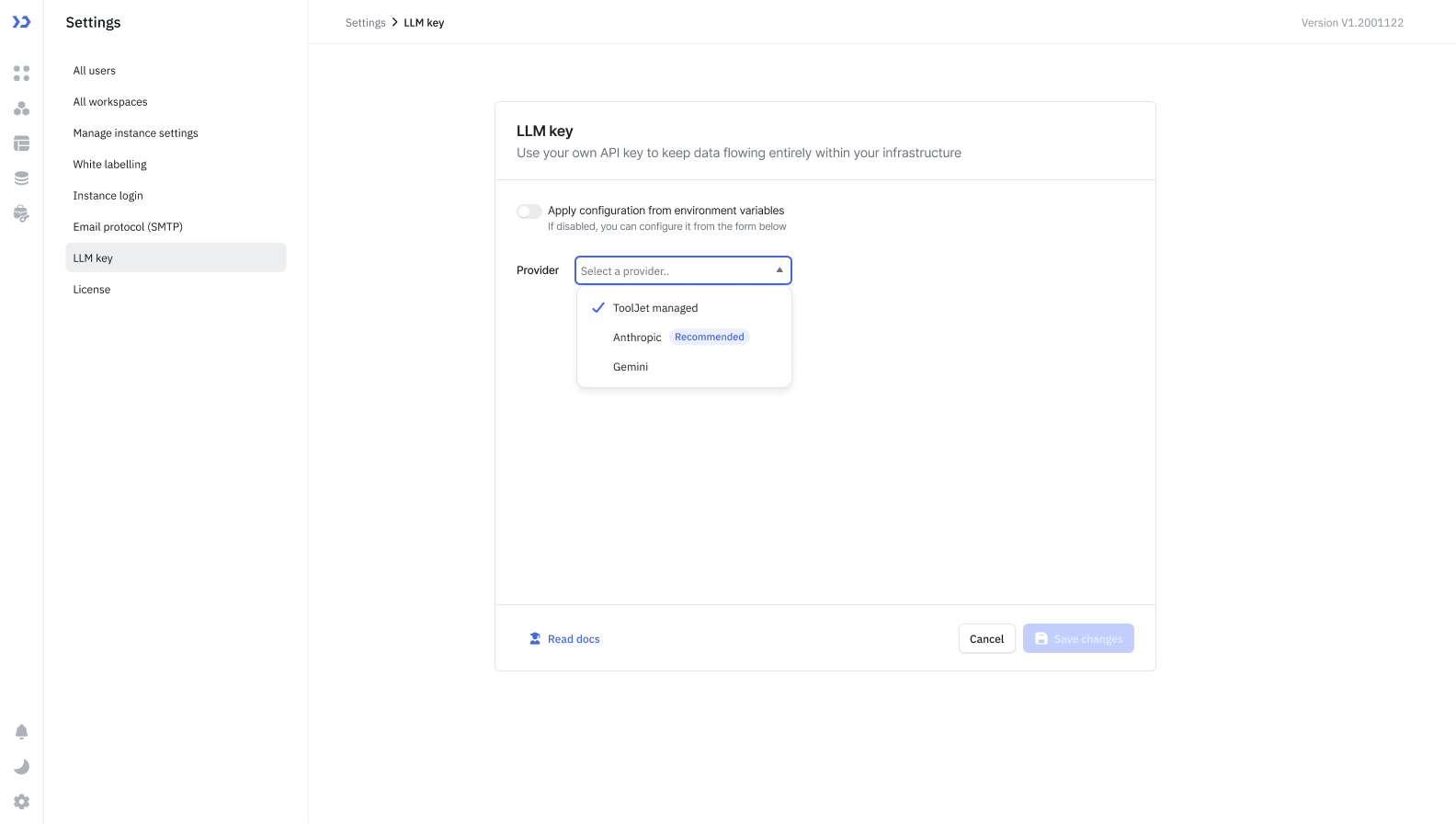 If you select OpenRouter, a Model dropdown appears listing the compatible models. Select the exact model you want to use; you can't save without one.
- After that, enter your API key from your LLM provider (e.g., your Anthropic API key from console.anthropic.com).
- Click Save changes.
ToolJet will use your key to authenticate requests sent to your LLM provider.
Configuring Your API Key via Environment Variables
Configuring the key through environment variables is available only on self-hosted deployments.
- Configure the following environment variables on your ToolJet server:
LLM_PROVIDER: You can set your LLM Provider using this variable.Value When to use anthropicWhen you want to use Anthropic API Key grokWhen you want to use Grok API Key openaiWhen you want to use OpenAI API Key openrouterWhen you want to use OpenRouter API Key tooljet_managedWhen you want to use ToolJet Managed AI Credits. - Set the following variable according to which LLM Provider you are using:
ANTHROPIC_API_KEY=<your-api-key>: If you are using Anthropic.GROK_API_KEY=<your-api-key>: If you are using Grok.OPENAI_API_KEY=<your-api-key>: If you are using OpenAI.OPENROUTER_API_KEY=<your-api-key>: If you are using Open Router.
- Once you have configured the above variables, navigate to Settings → LLM key and turn on the Apply configuration from environment variables toggle.

When you turn on the toggle, ToolJet checks that LLM_PROVIDER is set to one of the values listed above and that the matching API key variable is set. If either check fails, the toggle stays off and an error names the missing or invalid variable. Other values, such as gemini, are rejected.
When configuring OpenRouter using environment variables, model selection is currently not available. It will default to GPT-5.
Support for selecting the model through environment variables is on our roadmap and will be available in a future update.
Supported Providers
Currently, Anthropic, Grok, OpenAI, and OpenRouter are supported. Google Gemini is not available for BYOK. Support for additional LLM providers is planned for future releases.
OpenRouter offers a large number of models, but not all of them have been tested or are fully compatible with ToolJet. If a model you pick behaves unexpectedly, try switching to a different one.
Frequently Asked Questions
Will I still be charged ToolJet AI credits after configuring BYOK?
No. Once a valid API key is configured, all AI requests are authenticated using your key and billed directly to your LLM provider account. ToolJet AI credits are not consumed.
Does my API key get stored by ToolJet?
Your API key is stored securely within your ToolJet workspace settings. It is used solely to authenticate AI requests on your behalf.
Does BYOK work if I am using ToolJet Cloud?
Yes. BYOK is compatible with both ToolJet Cloud and self-hosted deployments.
Can I switch back to ToolJet AI credits after configuring BYOK?
Yes. You can select ToolJet managed as the provider in Settings → LLM key at any time to revert to ToolJet AI credits.
What happens if my API key is invalid or expires?
AI-powered features will fail to execute until a valid key is provided. You will need to update the key in Settings → LLM key.
Can users switch the AI provider or model when BYOK is configured?
No. With BYOK, the LLM provider (and model, if using OpenRouter) is configured by the admin for the entire workspace and cannot be changed per-user, unless the admin selects ToolJet managed as the provider. Per-user provider switching is only available with ToolJet Managed AI Server.