HubSpot
Integrating HubSpot with ToolJet allows you to access, manage, and automate your HubSpot CRM data within the ToolJet application.
Before following this guide, it is assumed that you have already completed the process of Using Marketplace plugins.
Connection
To connect HubSpot with ToolJet, you need the following credentials:
- OAuth type (ToolJet Cloud only): Select ToolJet app to connect through ToolJet's own HubSpot app, or Custom app to use your own HubSpot app. With ToolJet app, the Client ID and Client secret fields are hidden. New data sources default to Custom app. On self-hosted ToolJet, this dropdown isn't shown and the data source always uses Custom app.
- Client ID
- Client secret
- Scope(s): The permissions ToolJet requests from HubSpot, as a space-separated list. The field is pre-filled with a broad set of HubSpot scopes covering CRM objects and schemas, CMS, marketing, conversations, files, and settings. ToolJet sends exactly what is in this field. If you clear it, connecting fails with
HubSpot OAuth "scope" config is missing. Edit the list so it matches the scopes configured on your HubSpot app.
You can refer to the HubSpot guide for detailed steps to generate these credentials.
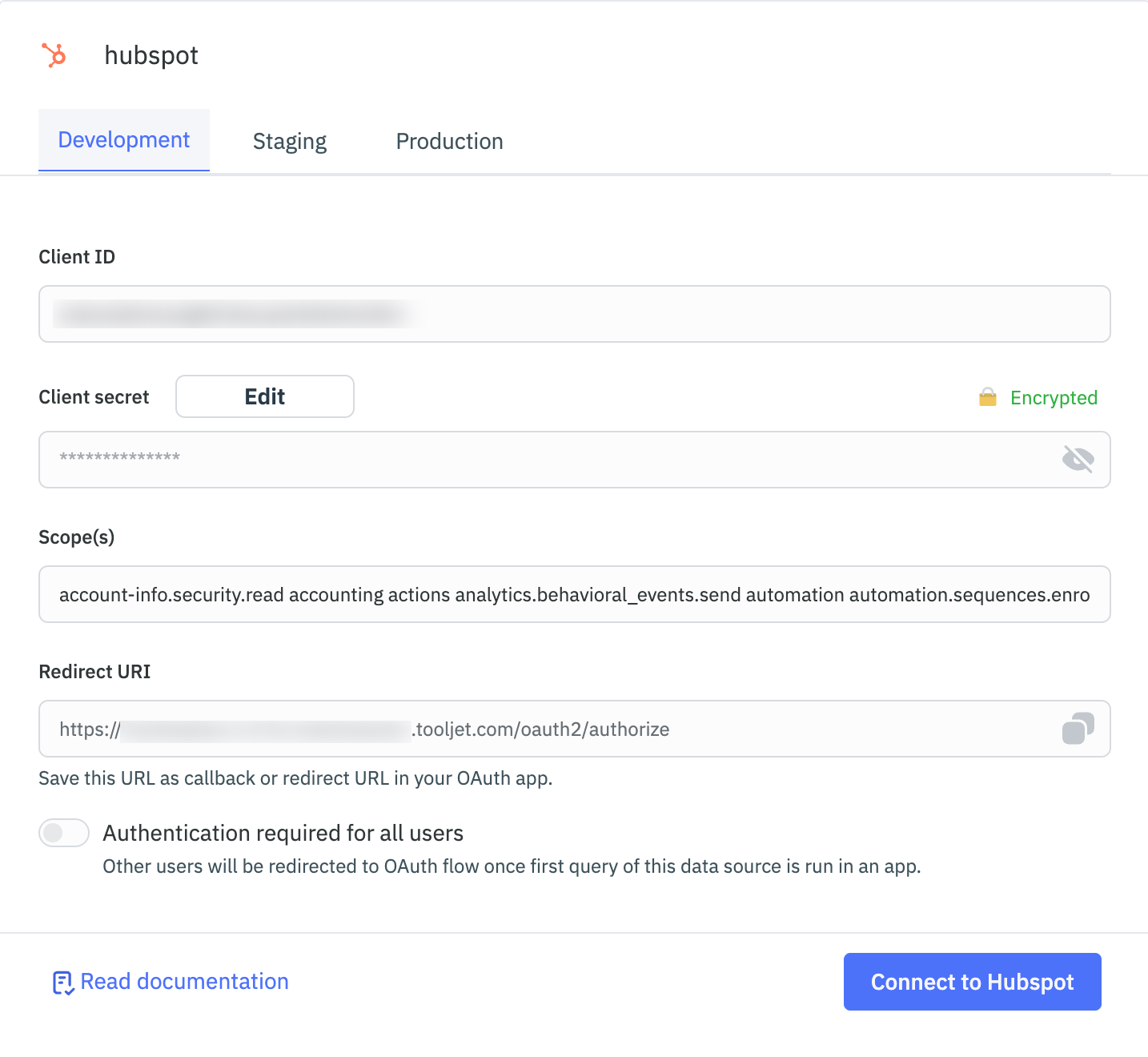
You can toggle on Authentication required for all users in the configuration. When enabled, users will be redirected to the OAuth consent screen the first time a query from this data source is triggered in the application. This ensures each user connects their own HubSpot account securely.
Supported Entities
HubSpot supports a number of entities as follows:
- Associations
- Audit Logs
- Blog Authors
- Blog Post
- Blog Tags
- Calling
- Cards
- Companies
- Contacts
- Custom Workflow Actions
- Deals
- Domains
- Feedback Submission
- Files
- Hub D B
- Imports
- Line Items
- OAuth Services
- Objects
- Owners
- Performance
- Pipeline
- Products
- Properties
- Quotes
- Schemas
- Site Search
- Subscription
- Tickets
- Timeline
- Transactional Email
- Url Redirects
- Video Conference
- Visitor Identification
- Web Hooks
Examples
Create a Deal
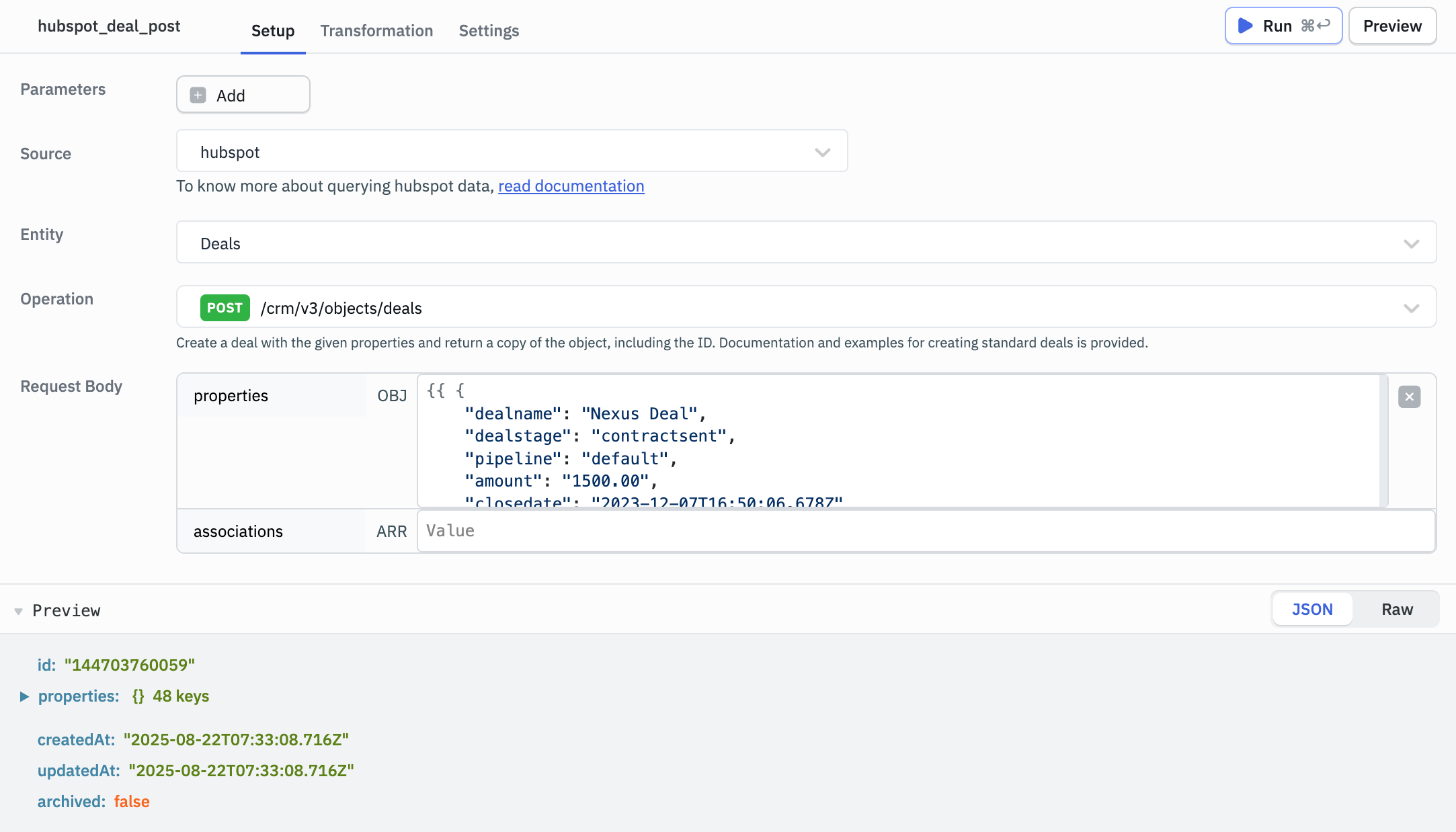
To create a new deal in HubSpot, use the endpoint:
POST /crm/v3/objects/deals
Provide the request body in JSON format:
{{ {
    "dealname": "New Deal",
    "dealstage": "contractsent",
    "pipeline": "default",
    "amount": "1500.00",
    "closedate": "2023-12-07T16:50:06.678Z"
} }}
Response Example
{
  "id": "144703760059",
  "properties": {
    "amount": "1500.00",
    "amount_in_home_currency": "1500.00",
    "closedate": "2023-12-07T16:50:06.678Z",
    "createdate": "2025-08-22T07:33:08.716Z",
    "days_to_close": "0",
    "deal_currency_code": "USD",
    "dealname": "Nexus Deal",
    "dealstage": "contractsent",
    "hs_actual_duration": "0",
    "hs_closed_amount": "0",
    "hs_closed_amount_in_home_currency": "0",
    "hs_closed_deal_close_date": "0",
    "hs_closed_deal_create_date": "0",
    "hs_closed_won_count": "0",
    "hs_createdate": "2025-08-22T07:33:08.716Z",
    "hs_days_to_close_raw": "0",
    "hs_deal_stage_probability_shadow": "0.90000000000000002220446049250313080847263336181640625",
    "hs_duration": "0",
    "hs_forecast_amount": "1500.00",
    "hs_is_closed": "false",
    "hs_is_closed_count": "0",
    "hs_is_closed_lost": "false",
    "hs_is_closed_won": "false",
    "hs_is_deal_split": "false",
    "hs_is_open_count": "1",
    "hs_lastmodifieddate": "2025-08-22T07:33:08.716Z",
    "hs_num_associated_active_deal_registrations": "0",
    "hs_num_associated_deal_registrations": "0",
    "hs_num_associated_deal_splits": "0",
    "hs_num_of_associated_line_items": "0",
    "hs_num_target_accounts": "0",
    "hs_number_of_call_engagements": "0",
    "hs_number_of_inbound_calls": "0",
    "hs_number_of_outbound_calls": "0",
    "hs_number_of_overdue_tasks": "0",
    "hs_object_id": "144703760059",
    "hs_object_source": "INTEGRATION",
    "hs_object_source_id": "16908533",
    "hs_object_source_label": "INTEGRATION",
    "hs_open_amount_in_home_currency": "1500.00",
    "hs_open_deal_create_date": "1755847988716",
    "hs_projected_amount": "0",
    "hs_projected_amount_in_home_currency": "0",
    "hs_v2_date_entered_current_stage": "2025-08-22T07:33:08.716Z",
    "hs_v2_time_in_current_stage": "2025-08-22T07:33:08.716Z",
    "num_associated_contacts": "0",
    "num_notes": "0",
    "pipeline": "default"
  },
  "createdAt": "2025-08-22T07:33:08.716Z",
  "updatedAt": "2025-08-22T07:33:08.716Z",
  "archived": false
}
Update a Contact
To update an existing contact, use the endpoint:
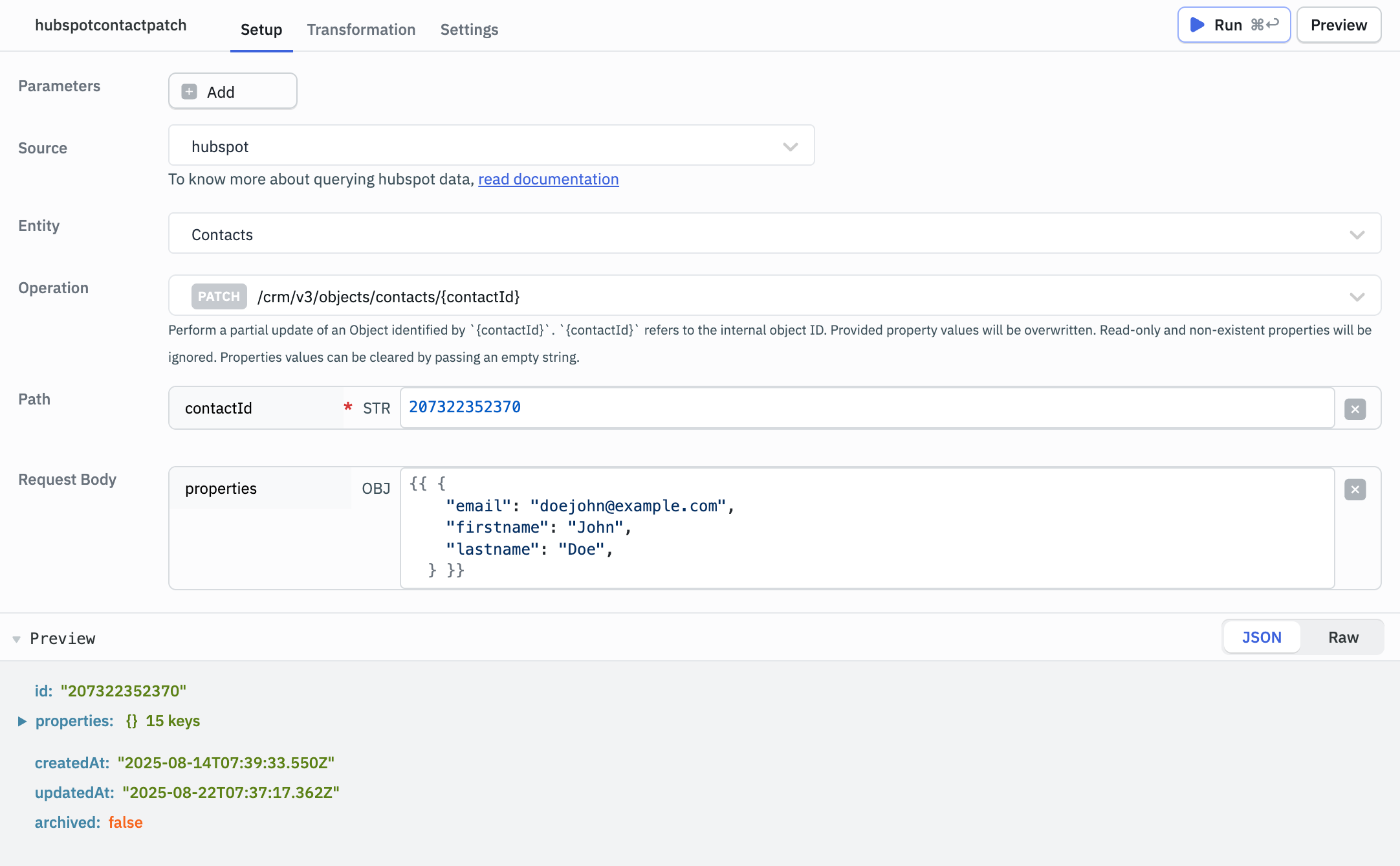
PATCH /crm/v3/objects/contacts/{contactId}
Enter the Contact ID in the contactId field.
Provide the request body in JSON format:
{{ {
    "email": "johnny@example.com",
    "firstname": "maria",
    "lastname": "Doe",
} }}
Response Example
{
  "id": "207322352370",
  "properties": {
    "createdate": "2025-08-14T07:39:33.550Z",
    "email": "doejohn@example.com",
    "firstname": "John",
    "hs_full_name_or_email": "John Doe",
    "hs_is_contact": "true",
    "hs_is_unworked": "true",
    "hs_object_id": "207322352370",
    "hs_object_source": "API",
    "hs_object_source_id": "sample-contact",
    "hs_object_source_label": "INTERNAL_PROCESSING",
    "hs_pipeline": "contacts-lifecycle-pipeline",
    "lastmodifieddate": "2025-08-22T07:37:17.362Z",
    "lastname": "Doe",
    "lifecyclestage": "lead",
    "notes_last_updated": "2025-08-14T09:39:34.956Z"
  },
  "createdAt": "2025-08-14T07:39:33.550Z",
  "updatedAt": "2025-08-22T07:37:17.362Z",
  "archived": false
}