Run Actions from RunJS query
ToolJet allows you to execute various actions within RunJS queries. This guide outlines the syntax and examples for each action.
Run Query
To trigger a query, you can use the below functions:
queries.getSalesData.run();
// replace getSalesData with your query name
or
await actions.runQuery("getSalesData");
// replace getSalesData with your query name
Example:
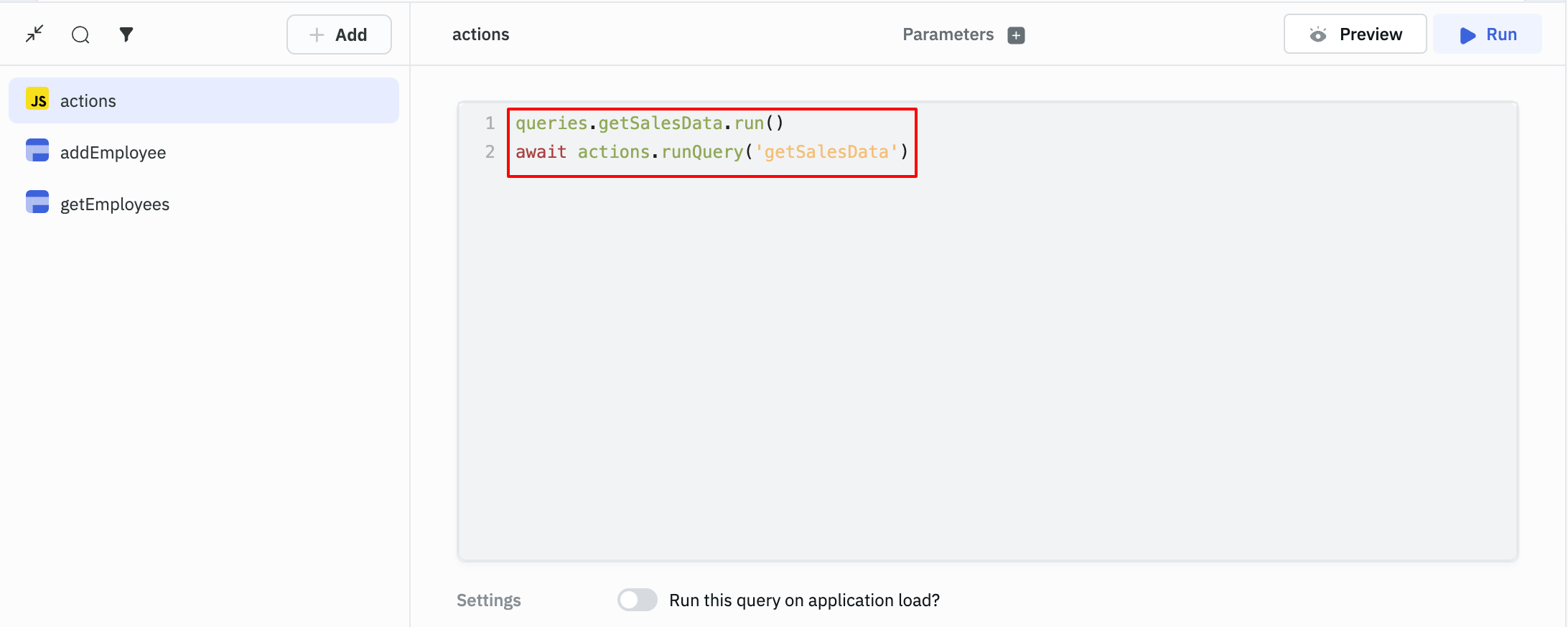
In the screenshot below, we are triggering two different queries using two different syntax available for Run Query action.
Get Query Data
In the previous section, we saw how we can trigger queries. Once the queries are triggered, if you want to immediately use the data returned by the query inside the RunJS query, you can use the getData(), getRawData() and getLoadingState() functions:
Trigger a query and retrieve its data:
await queries.getSalesData.run();
// replace getSalesData with your query name

let value = queries.getSalesData.getData();
// replace getSalesData with your query name
Trigger a query and retrieve its raw data:
await queries.getCustomerData.run();
//replace getCustomerData with your query name

let value = queries.getCustomerData.getRawData();
// replace getCustomerData your with query name
Trigger a query and retrieve its loading state:
await queries.getTodos.run();
//replace getTodos with your query name

let value = queries.getTodos.getLoadingState();
//replace getTodos with your query name
Set Variables
To create a variable, you can use the below function:
actions.setVariable("<variableName>", `<variableValue>`);
Unset Variable
To delete a created variable, you can use the below function:
Syntax:
actions.unSetVariable("<variableName>");
Get Variables
To access variables immediately after setting them in a RunJS query, you can use the getVariable and getPageVariable functions:
Set and retrieve a variable:
actions.setVariable("mode", "dark");
//replace mode with your desired variable name

return actions.getVariable("mode");
Set and retrieve a page-specific variable:
actions.setPageVariable("number", 1);
//replace number with your desired variable name

return actions.getPageVariable("number");
Logout
To log out the current logged-in user from the ToolJet, use the below function:
actions.logout();
Show Modal
To open a modal using RunJS query, use the below function:
actions.showModal("<modalName>");
Close Modal
To close a modal using RunJS query, use the below function:
actions.closeModal("<modalName>");
Set Local Storage
Set a value in local storage using the below code:
Syntax:
actions.setLocalStorage("key", "value");
Copy to Clipboard
Use the below code to copy content to the clipboard:
actions.copyToClipboard("<contentToCopy>");
Generate File
The below action can be used to generate a file.
actions.generateFile("<fileName>", "<fileType>", "<data>");
fileName is the name that you want to give the file(string), fileType can be csv, plaintext, or pdf and data is the data that you want to store in the file.
Example for generating CSV file:
actions.generateFile(
  "csvfile1",
  "csv",
  "{{components.table1.currentPageData}}",
); // generate a csv file named csvfile1 with the data from the current page of table
Example for generating Text file:
actions.generateFile(
  "textfile1",
  "plaintext",
  "{{JSON.stringify(components.table1.currentPageData)}}",
); // generate a text file named textfile1 with the data from the current page of table (stringified)
Example for generating PDF file:
actions.generateFile(
  "Pdffile1",
  "pdf",
  "{{components.table1.currentPageData}}",
); // generate a text file named Pdffile1 with the data from the current page of table
Go to App
You can switch to a different application using the below action:
actions.goToApp("slug", queryparams);
slugcan be found in URL of the released app afterapplication/or in the share modal that opens up when you click on theSharebutton on the top-right of the app-builderqueryparamscan be provided in this format -[ ['key1','value1' ], ['key2','value2'] ]
Show Alert
To show an alert using RunJS query, use the below code:
actions.showAlert("<alert type>", "<message>");
Available alert types are info, success, warning, and danger.
Example:
actions.showAlert("error", "This is an error");
Run Multiple Actions From RunJS Query
To run multiple actions from a RunJS query, you'll have to use async-await in the function.
Here is a example code snippet for running the queries and showing alert after specific intervals. Check the complete guide on running queries at specified intervals here.
actions.setVariable("interval", setInterval(countdown, 5000));
async function countdown() {
  await queries.restapi1.run();
  await queries.restapi2.run();
  await actions.showAlert("info", "This is an information");
}